Works with & more

You know the work. Now you can build the app.

Describe the roster, the stocktake, the quote sheet to Claude or ChatGPT. Croft runs it on your private server, behind company login, with access controls, versioning, and backups already in. The speed of building with AI, on a foundation a real business can keep.

7-day free trialFrom $24/monthFirst app live today

Built on Croft

One prompt in. A real app out.

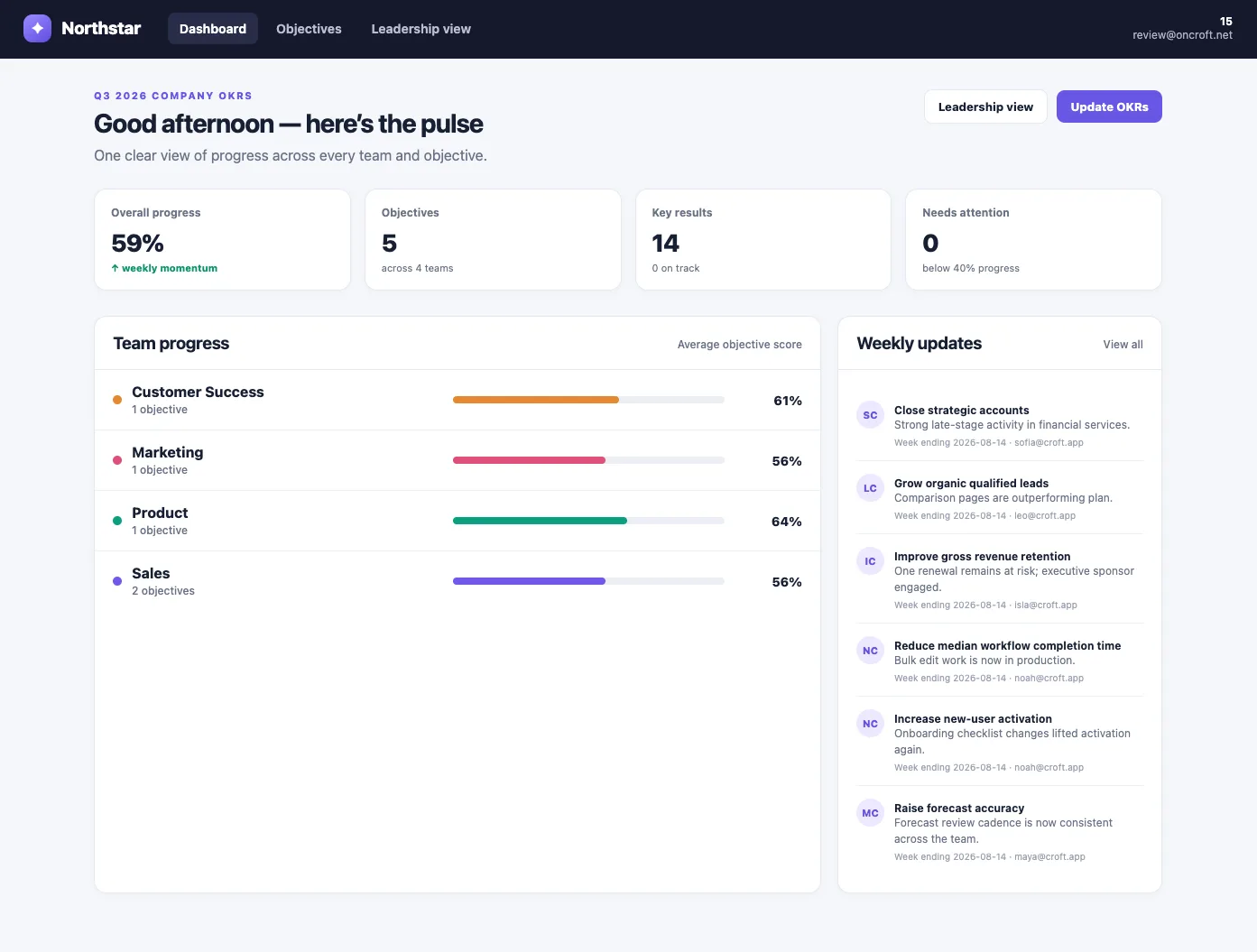
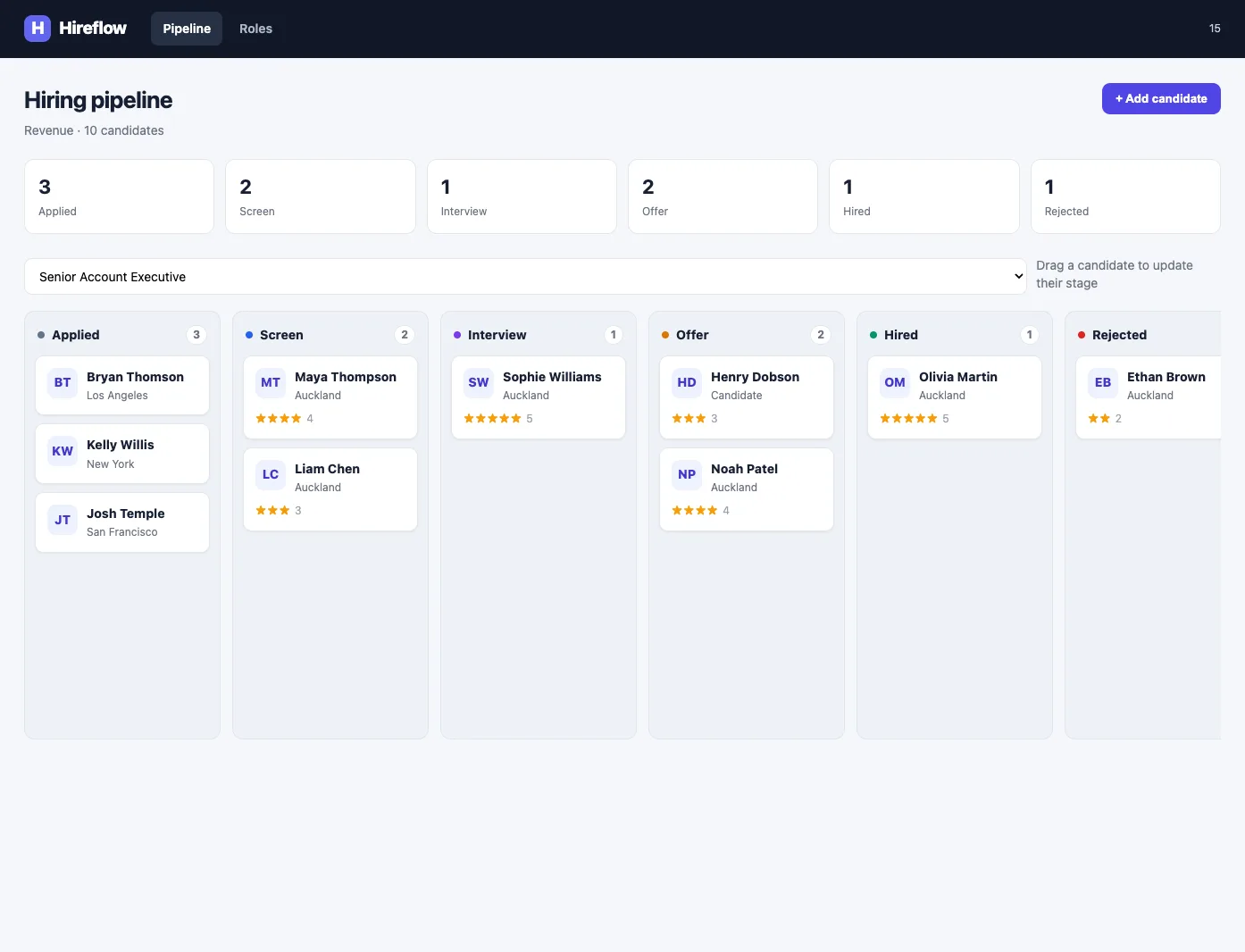
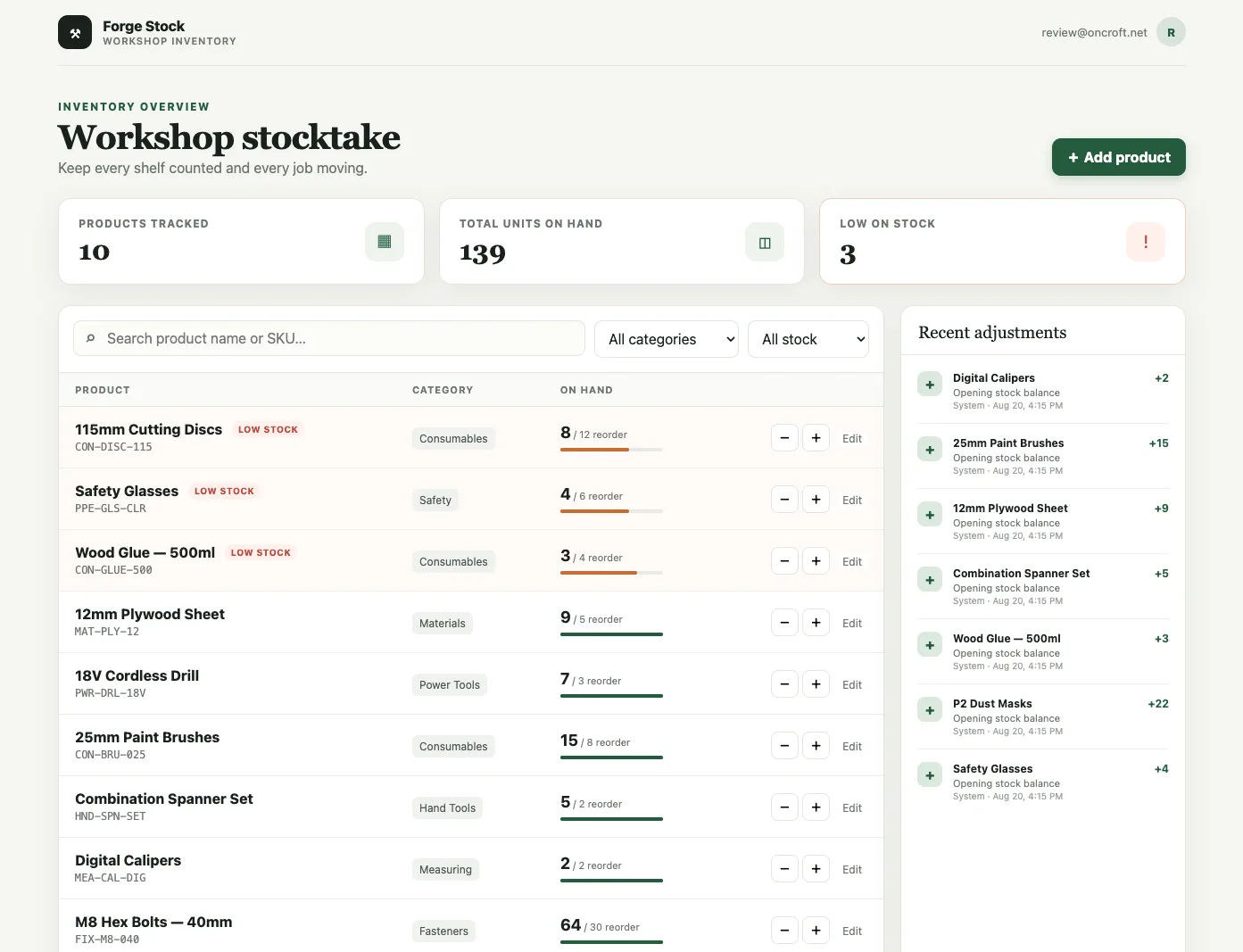
Every one of these was built by describing it to an AI assistant and deployed straight to a croft - a private server, a real database, and a login, all handled. Here's the exact prompt, and what came back.

Finance

Investment dashboard

The prompt

Build me a dark-mode financial dashboard on Croft. Connect it to live market data and show net asset value, returns, daily profit and loss, available cash, holdings, asset allocation, and risk metrics. Show portfolio performance against a benchmark, add an interactive watchlist and real-time market intelligence feed, and let analysts search holdings, switch chart periods, filter positions, and monitor live price updates.
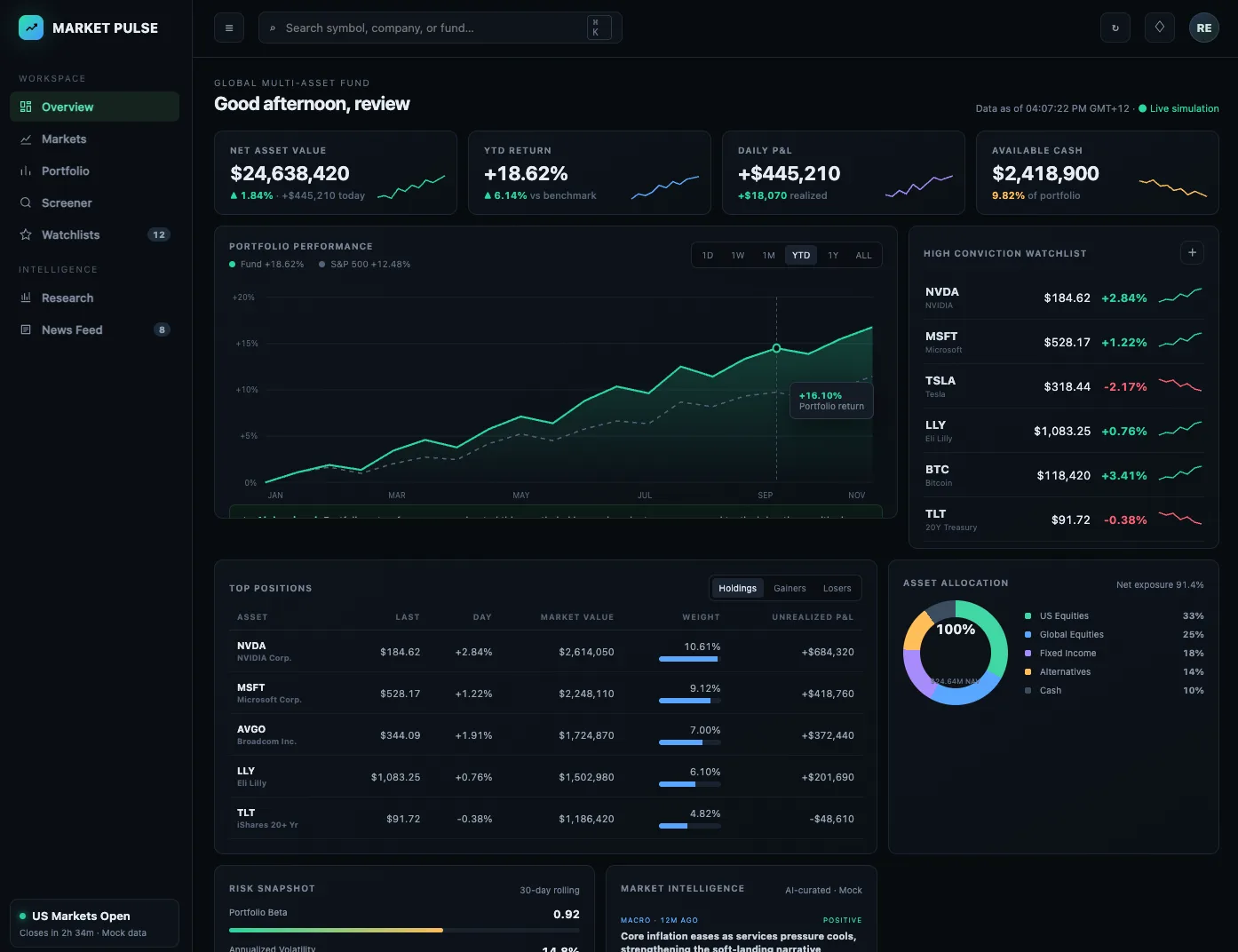
marketpulse.demo.oncroft.net
A dark-mode investment dashboard built on Croft - net asset value, returns, a portfolio performance chart, a high-conviction watchlist, top positions, and asset allocation.

How it works

From idea to "here's the link" in one conversation.

1

Get your croft.

Sign up, pick a name. Two minutes later your private server exists, with your login page and your empty apps list.

2

Connect your assistant.

Paste one link into Claude, ChatGPT, or Grok. Now it can build straight onto your croft - from the app, your desktop, or your phone. Or skip the setup and build right inside Croft with Croft Build. How to connect

3

Describe the app.

"Build me a cash-flow forecast the team can update." Your assistant writes it, deploys it, and hands you the link - live, HTTPS, behind your login.

4

Invite your people.

Add them by email. They tap the link, sign in with a passkey (no password to forget), and they're in. Add someone once, then pick which apps they can open.

Examples

Small software, real work.

Financial model the whole team can open
Client portal for your biggest customers
Stocktake tool for the workshop
Quote calculator that knows your margins
Onboarding checklist for new hires
Shift planner for the whole crew
Job board for the two vans
Approvals queue that emails the right person
Invoice tracker that matches how you actually invoice

Built in

More than hosting. The parts real apps need.

Your apps don't just sit there. They can face the public, reach the tools you already use, and run on their own - safely, because the platform holds the keys and the login, not the app.

Public pages & forms

A public page out front. Private results behind your login.

Publish a survey, an RSVP, a booking or feedback form at a public link anyone can open - with every response kept safe on the private side of your croft.

Grab a form prompt

Connectors & access control

Reach your other tools. Keep the keys out of the code.

Connect Stripe, your CRM, email, or any API - the key held by Croft, never in an app. Sensitive sources need an admin's approval, with an audit trail.

Connectors & governance

Scheduled tasks & automations

Apps that work while you sleep.

Give any app a schedule, or an event to react to. Connect your own AI and it can read, summarise, and decide - a morning briefing, a nightly sync, a report that just arrives.

See automations

One login

Every app, behind one secure sign-on.

Your croft is home to every app you build - each live at its own address, healthy and backed up. Your people sign in once through enterprise single sign-on, and you choose who can open what. Add someone from People; remove them once and they're out of everything.

demotime.oncroft.net
The Croft launchpad - every app you've built listed in one place, each live at its own address with a health status and a Share button, all behind one sign-on.

The platform

You build the apps. Croft is the platform they run on.

Croft isn't a software company - it's the hosting and single sign-on your AI-built apps run on. The unglamorous, essential parts - security, logins, backups, rollbacks - handled for you, so a clever prototype becomes software you can actually rely on.

Security, built in

Every app sits behind your login before a single line of its code runs - it can't ship a broken login page, because it doesn't contain one. HTTPS everywhere, passkeys instead of passwords, updates applied for you.

Enterprise-grade single sign-on

Access to every app runs on enterprise-grade single sign-on, built into the platform in front of your apps. Add your people once; they sign in with a passkey - nothing to remember - and every app they're allowed to open already knows who they are. No per-app accounts, no password resets.

You decide who sees what

Share some apps with everyone, keep others just for you. Access is yours to set, app by app. Someone leaves? Remove them once and they're out of everything, instantly.

Backups you can count on

Every app's data is backed up continuously to separate storage - and we practise restoring it. A backup nobody has tested is just a hope, so we test ours.

Roll back in one click

An update from your AI not right? Put any app back the way it was a moment ago with a single click. Every deploy is reversible - nothing stays broken.

Your AI can fix its own bugs

When something breaks, Croft gives Claude or ChatGPT the tools to read the app's logs on your croft, find the bug it wrote, fix it, and redeploy - often before you've noticed.

Three promises

Three things nobody else will promise you.

01 / YOUR PEOPLE

Add people once. You pick who sees what.

Add the people you trust once - your staff, teammates, and the people you work with. Then choose who can open which apps: some shared with everyone, some just for you. Croft handles the sign-in, so there's no login page to build and no passwords to manage. Someone leaves? Remove them once and they're out of everything.

02 / YOUR SERVER

You own the ground it stands on.

Every croft is a real private server with your name on it. Your apps and your data live there - not in someone's shared cloud. Want to leave someday? Take it all with you - every app, its data, and its code. It was always yours.

03 / NO METERS

A flat plan price. No usage meter.

Croft charges for the ground, not the ideas. Your plan is a flat price - a CRM, invoicing, a roster, and a helpdesk is still one bill, not four licenses. Build one app or a dozen and it doesn't move. Bring your own Claude, ChatGPT, or Grok over MCP and the thinking is on your account, so there's no surprise bill for prompting too enthusiastically on a Tuesday.

On purpose

Built small on purpose.

Croft apps are for your team or organisation - not the whole internet. That's not a limitation we're working on - it's the whole idea. Because your apps will never need to "scale" to strangers, they can live on a small server of your own. Your plan is a flat price with no usage meter. Nothing is public unless you make it public. And your software can be exactly as specific and particular as your business needs.

Building the next Airbnb? Genuinely, sincerely: we are not for you. There are excellent tools for that. Croft is for the software in between - the financial model, the quote calculator, the plant database, the thing you currently do in a spreadsheet that deserves better.

FAQ

Frequently asked questions

What is Croft?

Croft is private, secure hosting for vibe-coded apps a business actually runs. You chat with an AI to build the app; Croft runs it on your own private server, behind one login, with access controls, versioning, and backups.

Do I need to know how to code to use Croft?

No. You describe what you want to an AI assistant in plain words - or hand it a spreadsheet - and it builds and deploys the app onto your croft. You steer; the AI writes the code.

Which AI assistants work with Croft?

Claude, ChatGPT, Grok, Microsoft Copilot, or any assistant that speaks the open MCP standard. You bring your own AI account - Croft doesn’t resell AI or meter tokens.

Who can use the apps I build on Croft?

The people you invite. Everyone signs in through one enterprise single sign-on, and you choose who can open which apps. You can also publish public pages, like a survey, with the results kept private to you.

How much does Croft cost?

Croft has three plans - Solo, Team, and Enterprise - billed monthly or annually with no usage meter. There’s a 7-day free trial and no card required to start - see the pricing page for current plans.

Stake out your croft.

Your team's first app could be live before lunch.

Get your croft

7 days free, no card to start. From $24/month - cancel anytime and take everything with you.