Blog · September 23, 2026 · Rich Chetwynd
How to connect Croft to DigitalOcean Managed Agents
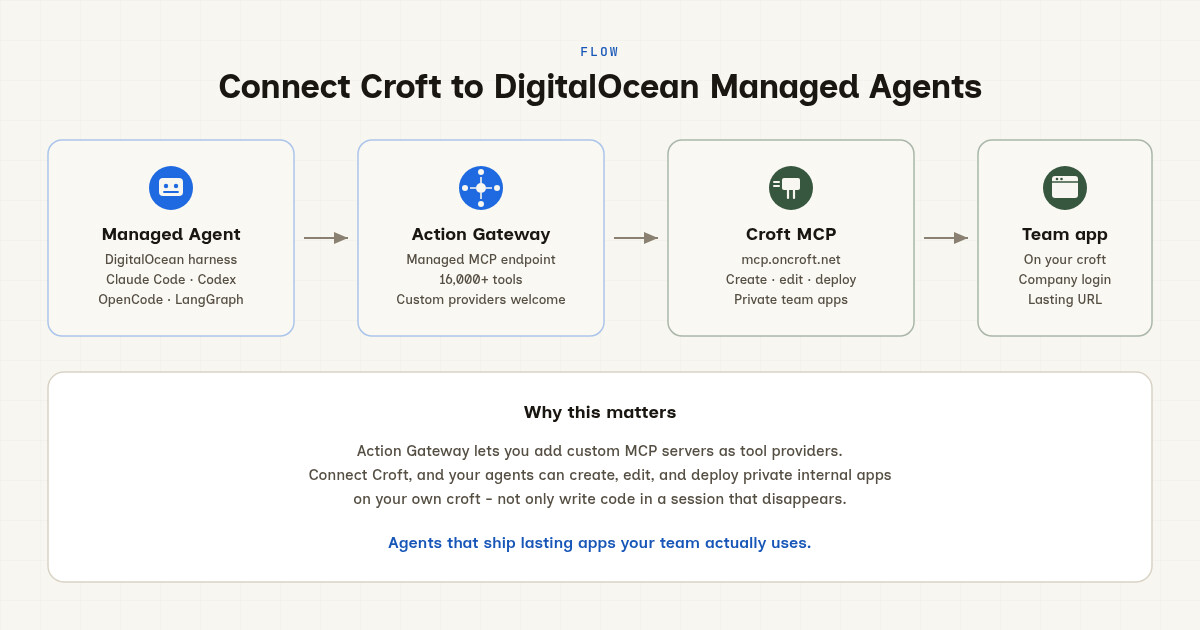
Use DigitalOcean Action Gateway to connect Croft MCP so your agents can create, deploy, and manage private internal apps on your own croft - not just write code that vanishes when the chat ends.
Quick answer
To use DigitalOcean Managed Agents to build private team apps, add Croft MCP as a custom tool provider in Action Gateway, enable Croft tools in a session, and run your agent. Your agent can then create, edit, and deploy apps on your own croft (private server with company login and backups) rather than just writing code in a chat that dies with the session. That is DigitalOcean agents that ship lasting apps: not a public host, not a laptop experiment, and not another AI chat that forgets everything when you close the tab.
The gap between agent and app
You already run agents on DigitalOcean Managed Agents. Claude Code, Codex, OpenCode, Hermes, LangGraph, or your own harness on Harness Runtime. The agent writes code, tests it, iterates, and finishes. Then what?
What usually happens:
- The agent produced a working HTML file. You copy it out. It lives on your laptop. Nobody else can open it, and when you need a change you start from scratch.
- You push to a public AI-app host. Your internal tool sits on the open web unless you bolt login on yourself.
- You export to Replit or Vercel. Your team does not have a lasting private place for the internal apps AI built, so those apps drift into personal accounts and disappear when someone leaves.
- You ask your agent to write Terraform or Docker Compose. You still own the ops, and the business waits on your backlog.
So DigitalOcean gives you a cloud agent runtime. You still do not have a private place those agents put lasting internal apps for the company. That is where Croft comes in.
What Managed Agents and Action Gateway give you
DigitalOcean Managed Agents launched in public preview September 2026. It is two things:
- Harness Runtime - run coding and agent harnesses (Claude Code, Codex, OpenCode, Hermes, LangGraph, custom workflows) in durable Firecracker microVMs. Your agent can pause, resume, fork, and run parallel sessions. Long-running agents do not die when your laptop sleeps.
- Action Gateway - a managed MCP endpoint that gives agents governed access to 16,000+ tools from the DigitalOcean catalog. Credentials are brokered at execution time (not exposed to the model or sandbox), and teams can add their own remote MCP servers as custom tool providers.
Action Gateway is the bridge. Instead of building a custom integration for every tool, you register an MCP server once and every harness on Harness Runtime can call those tools through the gateway.
DigitalOcean handles authentication (none, API key, or OAuth), discovers and catalogs the tools, and exposes them as one managed MCP session. Your agent calls create_app, the gateway brokers the credential, and the tool runs on the provider (Croft in this case). No SDK, no bespoke wiring per harness.
What Croft MCP gives your agents
Croft is a private place for the apps you build with AI. Not a public AI-SaaS host, not a VPS you babysit, and not a laptop session that vanishes when you reboot. Your own private server with one company login, backups, rollbacks, connectors, and monitoring built in.
Croft speaks MCP. When you connect Croft as a custom tool provider in Action Gateway, your DigitalOcean agents can:
- Create apps - your agent calls
create_appwith a name and platform (Node, Python, static). Croft provisions the app on your server. - Write and edit code -
write_fileslets the agent update the codebase, change screens, or refactor logic. Changes stay in the repo until you deploy. - Deploy -
deployships the app live, with zero-downtime rolling deploys and a new version logged for rollbacks. - Read app state -
get_appandlist_appslet the agent check what is deployed, who has access, and what connectors are granted. - Manage connectors - grant your app access to Stripe, HubSpot, Xero, Slack, or 45+ other tools through Croft connectors, so credentials stay with the platform instead of scattered through app code.
- Monitor and fix -
app_errors,app_metrics, andlogslet the agent see what broke, read the stack trace, and deploy the fix before anyone has to ask. More on monitoring.
Every app lives behind your company login. Colleagues get one URL, they sign in, and they use the app your agent built. Not a public link you lock down after the fact, and not a shared credential pasted into the code.
Two ways to connect Croft
Add Croft in Action Gateway
Register Croft MCP (https://mcp.oncroft.net) as a custom tool provider in Action Gateway. That is the governed, managed setup:
- Go to the DigitalOcean Control Panel and navigate to Managed Agents → Action Gateway → Tools.
- Click Add custom provider.
- Enter the Croft MCP endpoint:
https://mcp.oncroft.net - Choose authentication (OAuth for Croft; see how to connect for Croft OAuth flow).
- Action Gateway discovers and catalogs the Croft tools.
- Enable the Croft tools you want in your session or Toolbelt.
- Your agent connects to the session MCP URL with your DigitalOcean token. When it calls
create_appordeploy, Action Gateway brokers the credential and routes the call to Croft.
This path gives you centralized credential management, audit logs for tool calls, and the full Action Gateway catalog (Croft tools plus 16,000+ others) in one session.
Or connect Croft MCP directly from your harness
Many harnesses on Harness Runtime are also MCP clients. Claude Code, Codex, OpenCode, and others can connect straight to Croft MCP while still running on DigitalOcean.
If your harness already supports MCP connections, you can connect Croft directly the same way you connect Claude Desktop or Cursor:
- Point the MCP client config at
https://mcp.oncroft.net - Authorize once through the OAuth flow
- The agent calls Croft tools directly (not through Action Gateway)
This path works today for teams already using Croft MCP with Claude or Cursor and want the same flow on DigitalOcean. The agent runs on Harness Runtime; Croft tools are available; apps deploy to your croft.
The difference: Action Gateway adds governance, credential brokering, and a unified tool catalog. Direct MCP is faster for teams who only need Croft and already know how to connect MCP clients.
Steps: Connect Croft to Action Gateway
Here is the full flow to connect Croft MCP as a custom tool provider in DigitalOcean Action Gateway:
1. Get a croft
If you do not have one yet, sign up for a croft. Solo starts at $24/month (billed yearly), Team is $99/month. 7-day free trial, no card required to start. Your croft is your own private server where agents will deploy apps.
2. Add Croft as a custom tool provider
- Log into the DigitalOcean Control Panel.
- Navigate to Managed Agents → Action Gateway → Tools.
- Click Add custom provider.
-
Enter the Croft MCP endpoint:
https://mcp.oncroft.net - Choose OAuth for authentication (Croft uses OAuth to authorize tool calls).
- Follow the Croft authorization flow:
- You will be redirected to Croft to approve the connection.
- Sign in with your Croft account.
- Grant Action Gateway permission to call Croft tools on your behalf.
- You are redirected back to DigitalOcean.
- Action Gateway discovers the Croft tools and adds them to your catalog.
You only do this once per team. Every harness session can now use Croft tools.
3. Enable Croft tools in a session or Toolbelt
Action Gateway uses sessions to group tools for a harness run. Create a new session or Toolbelt, browse the catalog, and enable the Croft tools you want:
create_app- create a new app on your croftget_app- read app detailslist_apps- list all apps on your croftwrite_files- write or update app codedeploy- deploy an app livestatus- check deploy statuslogs- read app logsapp_errors- list open error groupsapp_metrics- fetch response time, throughput, failure raterollback- roll back to a previous deploydelete_app- delete an appset_secret- store a secret for an applist_connectors- list available connectors (Stripe, HubSpot, Xero, etc.)grant_connector- grant a connector to an applist_users- list team membersinvite_user- invite someone to the croftgrant_access- give a colleague access to an apprevoke_access- remove access
Enable the ones your agent needs. If you are not sure, enable all of them. Your agent will call the relevant tools when it needs them.
4. Run your agent with Croft tools
Start your harness (Claude Code, Codex, OpenCode, LangGraph, custom) on Harness Runtime and point it at the session MCP URL. Your agent now has Croft tools in its toolbelt.
Ask your agent to build a private internal app:
Build a timesheet app for the team. Let people log hours, see their week, and export to CSV. Deploy it to my croft.
Your agent:
- Calls
create_appto provision the app on your croft. - Calls
write_filesto write the HTML, JS, and backend code. - Calls
deployto ship it live. - Returns the private URL for your team.
Colleagues open that URL, sign in with company login, and start logging time. Not a public host, not a laptop file, and not a chat artifact that disappears when you refresh.
5. Keep iterating
When you want a change, ask the agent:
Add a manager view that shows everyone’s hours for the week.
The agent:
- Calls
get_appto check the current state. - Calls
write_filesto add the manager screen. - Calls
deployto ship the change.
Done. No git push, no SSH, no “how do I deploy this thing again?” The agent does it.
If the change breaks something, Croft monitoring catches it. Your agent can call app_errors to read the stack trace, fix the code, and redeploy. More on monitoring for Croft apps.
What to ask your agent to build
DigitalOcean agents with Croft tools can build the same internal apps you would build in Claude or ChatGPT, but deploy them privately for your team:
- Dashboards - pull from Stripe, HubSpot, Xero, or Postgres through Croft connectors, show the numbers the team needs, and share one private link.
- Client portals - let customers see their data, submit tickets, or download invoices behind a login you did not have to build.
- Admin tools - bulk update orders, approve time off, reconcile payments, or edit catalog entries without touching the production database by hand.
- Internal workflows - onboarding forms, equipment requests, vendor approvals, or weekend on-call schedules that route to Slack or email.
- Scheduled reports - Croft automations can run on a cron, pull data, generate a PDF, and email it. Your agent can build and deploy the automation the same way it builds an app.
- Integrations - sync Xero invoices into your croft database so other apps can query them; see the Xero Sync template for a working example.
Ready-made starting points: Croft templates. More on connectors: connectors list.
The difference between an AI-built app and an AI-built app on Croft: your team has a lasting place to open it, and you can keep improving it in chat.
Why Croft instead of a public host or DIY VPS
| Need | Public AI-app host | DIY VPS + Docker | Croft |
|---|---|---|---|
| Private by default | No (public unless you lock it down) | You build login | Yes |
| Agent can deploy | Sometimes | Rarely | Yes (via MCP) |
| Team login for colleagues | You build it | You build it | Built in |
| Backups and rollbacks | Varies | Your problem | Included |
| Connectors (Stripe, HubSpot, Xero) | Your problem | Your problem | Built in |
| Monitoring and error tracking | Your problem | Your problem | Built in |
| Keep iterating with AI | Varies | Rare | Yes |
| No devops required | Sometimes | No | Yes |
Croft is the private place for vibe-coded and AI-built internal apps. It is not a public Vercel-style host for AI SaaS products, and it is not a generic PaaS. You bring the app idea (or the agent builds it); Croft gives the team a shared app on a private server, one company login, and the connectors and monitoring so the app keeps working after the agent finishes.
FAQ
How do I connect Croft to DigitalOcean Managed Agents?
Add Croft MCP (https://mcp.oncroft.net) as a custom tool provider in Action Gateway. Choose OAuth for authentication, authorize once, enable Croft tools in your session, and run your agent. Details in the steps above.
Can DigitalOcean agents deploy apps to my croft?
Yes. Once Croft is connected via Action Gateway or direct MCP, your agent can call create_app, write_files, and deploy. The app goes live on your private croft server, behind company login.
What agents can use Croft through Action Gateway?
Any harness running on Harness Runtime: Claude Code, Codex, OpenCode, Hermes, LangGraph, or your own custom agent. If the harness can call MCP tools through Action Gateway, it can use Croft.
Do I need a DigitalOcean account?
Yes, to use Managed Agents and Action Gateway. If you only want to use Croft with Claude Desktop or Cursor, you do not need DigitalOcean; see connect Claude or connect Cursor.
Do I need a Croft account?
Yes. Croft is your own private server where the agent deploys apps. Sign up here (7-day free trial, no card to start). Solo is $24/month billed yearly, Team is $99/month.
Is Croft an official DigitalOcean partner?
No. Croft is an independent product that speaks MCP, so it works as a custom tool provider in Action Gateway. DigitalOcean built Action Gateway to support any MCP server; Croft is one example.
Can I use Croft MCP with other agents (Claude, ChatGPT, Cursor)?
Yes. Croft MCP works with any MCP client: Claude Desktop, ChatGPT, Cursor, Grok, Croft Build, or your own tool. The same endpoint (https://mcp.oncroft.net) connects to all of them. See connect for setup instructions per assistant.
What if I already use Croft with Claude or Cursor?
Keep doing that. DigitalOcean Managed Agents is another way to run agents with Croft tools, not a replacement. If your workflow is “build in Claude Desktop, deploy to Croft,” nothing changes. Managed Agents is for teams who want a cloud agent runtime with durable sessions, parallel runs, and a governed tool catalog.
Where do credentials live?
When you connect Croft via Action Gateway, DigitalOcean brokers the OAuth token at tool-call time. Your Croft credentials never reach the model or the agent sandbox. When you connect Croft directly, the MCP client holds the token. Either way, credentials are not scattered through app code.
Can agents manage connectors through Croft?
Yes. The list_connectors, grant_connector, and describe_connector tools let your agent see what connectors are available (Stripe, HubSpot, Xero, Slack, and 45+ more) and grant them to apps. The business authorizes the connector once in the Croft dashboard; the agent can attach it to apps via MCP.
Do apps stay on my croft after the agent finishes?
Yes. That is the point. Public AI-app hosts make your internal tool public by default. Laptop experiments vanish when you close the tab. Croft is the private place the apps live after the agent finishes. Your team opens one URL, signs in, and uses the app. When you want a change, you talk to the agent again and it redeploys.
How much does Croft cost?
Solo is $24/month on annual billing (billed yearly at $288), Team is $99/month on annual billing (billed yearly at $1,188). 7-day free trial, no card required to start. See pricing for full details.
What is the difference between Harness Runtime and Croft?
Harness Runtime is where the agent runs (durable Firecracker microVMs, pause/resume, parallel sessions). Croft is where the apps live (private server, company login, backups, connectors, monitoring). They are complementary: DigitalOcean gives you a cloud agent runtime; Croft gives you a private place those agents put lasting apps.
Get your croft → · Connect Claude → · Connect Cursor → · Croft templates →
Stake out your croft.
Your team's first app could be live before lunch.
Get your croft7 days free, no card to start. From $24/month - cancel anytime and take everything with you.