Blog · September 22, 2026 · Rich Chetwynd
Monitoring for every Croft app, with nothing to install
Every app on Croft now comes with monitoring built in - response time tracking, error grouping, logs, alerts, and MCP tools so your assistant can fix what breaks.
Every app on Croft now comes with monitoring built in. No SDK, no agent, no dashboards to set up, no extra cost. When something breaks you get an email - and your AI assistant can see the error, fix it, and deploy the fix.
The problem we are solving
You built an app by talking to Claude or ChatGPT. It worked, you shared it with your team, and now it is part of how the business runs. Then it breaks. Your team sees “something went wrong.” Your assistant sees nothing at all.
Traditional APM - New Relic, Datadog, Sentry - needs an account, an SDK wired into the code, and usually an engineer to set it up and read the results. That does not fit someone who built an app in an afternoon by conversation.
What you get
Starting today, every app on Croft includes monitoring. Your app runs; Croft records what matters:
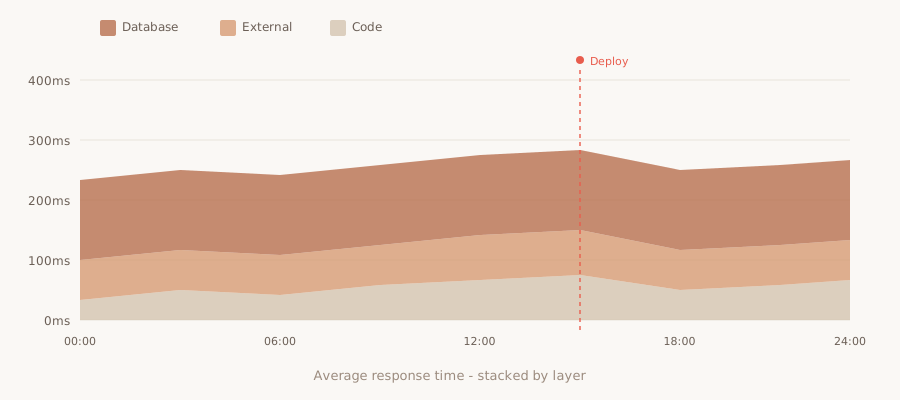
- Response time breakdown - for apps on the Croft runtime, see where time goes with a stacked breakdown of database, external API calls, and code execution (the same New Relic-style profiling, built in).
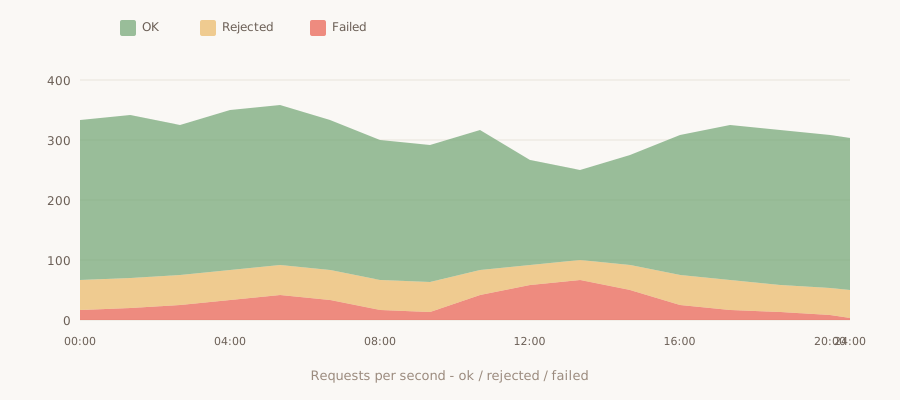
- Throughput and failure rate - track ok, rejected, and failed requests over time, with charts showing patterns and spikes.
- Error groups - Croft auto-groups errors by type and location. The same error from a hundred requests shows as one group, with a stack trace and which requests failed.
- Slow requests - waterfall views of your slowest requests, showing exactly which database queries or API calls took the time.
- Slowest SQL - a list of your slowest database queries, so you know what to optimise.
- 7 days of logs - search by level, time, or keywords, right in the panel.
- Health checks and resources - track your app’s health check, server CPU, memory, and database size over time.
- Deploy markers - charts show when each deploy shipped, so you can see exactly when a change went out.
All up to the minute, all included.
The fix loop
When an app breaks, your AI assistant can help. The Croft MCP includes three monitoring tools:
- app_errors - list open error groups, read stack traces, and see which requests failed.
- app_metrics - fetch response time, throughput, failure rate, or server resources for any app.
- logs - search and read the last 7 days of logs, filtered by level or keywords.
Your assistant can read the error via MCP, see the logs and stack trace, fix the code it wrote, and deploy the fix - usually before you have made tea.
Or click Fix with Build on any error in the panel, and it hands the stack trace and logs to Croft Build - the built-in AI chat - which fixes and redeploys.
When you ship a fix, error groups auto-resolve after Croft sees no new occurrences in the next deploy. No manual triage, no stale open errors cluttering the list.
Alerts you can live with
Croft sends alert emails for three things:
- New error - the first time Croft sees an error it has not grouped before, with the stack trace and a Fix with Build link.
- High failure rate - when a large percentage of requests fail over a short window, you get one alert with the failure count and Fix with Build (not one per request).
- App unhealthy - if your app’s health check fails or the app stops responding, with a confirmation email when it recovers.
Once per app per day at most, so you are informed but not flooded.
Privacy: data stays on your server
Logs, errors, stack traces, and slow request traces live on your own Croft server, with 7-day retention. Only aggregate counts and timings - requests per second, average response time, failure rate - go to the control plane for charts.
No query strings, request bodies, cookies, or IP addresses are recorded. Your telemetry is yours.
Included. No extra cost.
Monitoring is included on Solo and Team plans, with no usage pricing or separate bill. Your apps come with monitoring the day you deploy them.
See what monitoring gives you →
The vibe-coded app lifecycle
You build an app in an afternoon by chatting with AI. It runs on your own private server, behind one login. Your team uses it, it becomes part of how the business works - and now, when it breaks, you know. Your assistant knows. And the fix ships before anyone has to ask.
That is the point: the speed of building with AI, on a foundation a real business can keep. Monitoring is the latest piece. More to come.
Start your free trial.
Your team's first app could be live before lunch.
No card. 7 days. Cancel anytime.