Blog · October 25, 2026 · Rich Chetwynd
How do I stop exporting spreadsheets to ChatGPT?
Stop exporting spreadsheets to ChatGPT. Connect ChatGPT to your business data on Croft: a tidy, current copy of Xero, Stripe, HubSpot and the other tools you already run, on your private server, with how fresh the numbers are.
Quick answer
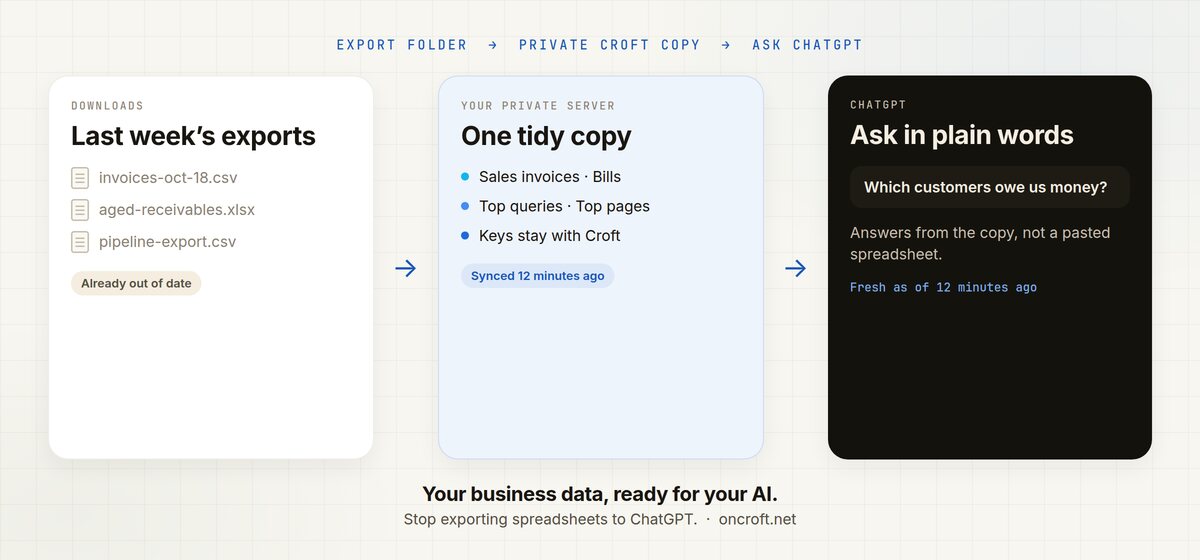
To stop exporting spreadsheets to ChatGPT, connect your business tools on Croft. Croft keeps a tidy, current copy of that data on your own private server. Connect ChatGPT once, then ask in plain words: who owes you money, which deals stalled, what search queries lost clicks. ChatGPT answers from that copy and says when the data was last synced. You do not download a CSV and paste it into chat, and you do not give ChatGPT your logins.
That is the site’s pitch in one job: your business data, ready for your AI. Same idea if you want to connect ChatGPT to my business data: one copy on your server, then ask.
Stop pasting last week’s export into chat
The numbers already live in the tools you run. The usual ways of getting ChatGPT to talk about them are a poor fit:
- You export invoices, payments or a pipeline to a spreadsheet, then paste the file into ChatGPT. The numbers are already old. Next week you do it again.
- You drop API keys or a login into a prompt so the model can “just fetch it.” The AI is now holding credentials it should never see.
- Someone on the team has a fresher file than everyone else. Follow-up questions depend on whoever exported last.
Finance, sales and ops hit the same wall. The data is fine. ChatGPT cannot see a current, controlled copy of it.
If the job is a screen the team opens, not only answers in chat, see use Xero data in a private internal app. For asking Claude about the books specifically, see how to ask Claude about your Xero data.
Export and paste vs connected data
| Need | Export a spreadsheet into ChatGPT | Croft connected data |
|---|---|---|
| Current invoices, deals, payments | Stale the moment you export | Tidy copy on your private server |
| Named tables the AI can read | You hope the columns make sense | Sales invoices, Bills, Contacts, Payments, Top queries, Top pages |
| Says how fresh the numbers are | No | Yes, for example “synced 12 minutes ago” |
| Keys and passwords stay off the AI | The file still left the tool | Croft holds the connection |
| Who on the team can ask | Whoever has the file | Admins decide per source |
| Same answers in Claude or Cursor | Paste the file again | One copy, many assistants |
| Then do the work (email overdue invoices) | Manual | Your AI builds a small app on Croft |
Croft is not “connect ChatGPT straight to Xero.” ChatGPT reads the curated copy on your server. It never sees a password or API key. Setup: connectors, Xero, Google Search Console, your data.
Steps: connect your tools, connect ChatGPT, ask
- Start a free trial to get a croft, your private server. 7 days, no card.
- Connect the tools you already run. Connecting Xero starts a sync of invoices, bills, contacts, payments and accounts as named datasets: Sales invoices, Bills, Contacts, Payments, plus ready-made summaries such as who owes you most. Google Search Console comes in as Top queries, Top pages and Queries losing clicks, by day, query, page, country and device. You can also connect Stripe, HubSpot, Pipedrive, Attio, Square, Paddle and 50+ other tools. New sources are visible to admins until you open them to the team or to named people. You choose how much history to keep.
- Connect ChatGPT. Copy the connection link from your croft, turn on Developer mode in ChatGPT (Plus or better), add Croft as a plugin, and sign in. Claude, Cursor and Grok use the same kind of link. Developers can point a coding assistant at the same croft.
- Ask. ChatGPT lists the sources you are allowed to see, reads those datasets, and tells you when they were last synced. Use Sync now on the Data page when you want a fresh pull before a meeting.
The connection is MCP, so any assistant that speaks it can query the same copy. The AI does not log into your tools.
Questions to ask ChatGPT
Use the same prompts the Data page suggests, then go further:
- Which customers owe us the most, and how overdue are they?
- What did we spend by category last month compared with the month before?
- Which pages lost the most clicks this month, and why might that be?
- What are our top 20 search queries over the last 28 days?
- Summarise this week’s new invoices and payments.
- Which queries get lots of impressions but few clicks?
Ask follow-ups in the same chat. ChatGPT stays on the synced copy, so you are not attaching another spreadsheet.
When you want something done, not only answered, ask your AI to build a small app on Croft: Every Monday, email me the list of overdue invoices. That app uses your connectors without seeing the keys, can run on a schedule, and offers actions anyone’s connected assistant can run from then on. Destructive actions ask first, and every run is logged with who asked and which AI did it. See integrations and automations.
Everyone’s AI also shares team memory. Tell ChatGPT “remember for the team: refunds over $500 need Sam’s approval” and Claude knows it too.
FAQ
How do I stop exporting spreadsheets to ChatGPT?
Connect your tools on Croft so a tidy copy of their data stays in sync on your private server. Connect ChatGPT, then ask in plain words. ChatGPT reads that copy and tells you when it was last synced. Start from your data.
How do I connect ChatGPT to my business data?
You do not point ChatGPT at each tool. Connect Xero, Google Search Console or another source to Croft, then connect ChatGPT to Croft. ChatGPT reads the synced copy. Credentials stay with Croft. ChatGPT Plus or better is required.
Can Claude or Cursor see the same data?
Yes. Connect Claude the same way. Cursor and Grok work too. Each assistant sees the sources you have allowed.
Which tools can Croft keep a copy of?
Xero syncs invoices, bills, contacts, payments and accounts. Google Search Console syncs search data by day, query, page, country and device. Connect Stripe, HubSpot, Pipedrive, Attio, Square, Paddle and other tools the same way. Each connector page says what that tool brings in.
Does ChatGPT get my API keys?
No. Croft holds the connection. The AI never sees a password or API key.
Who can ask ChatGPT about our data?
Admins first. An admin can open the source to everyone or to named people. Your AI follows the same rule.
Can ChatGPT email overdue invoices every Monday?
Ask it to build that job as a small app on Croft. Details: automations.
How much does Croft cost?
Solo from $24/month billed annually, Team $99/month billed annually, Enterprise custom. 7-day free trial, no card to start. See pricing.
Start free trial → · Connect ChatGPT → · Connectors → · Your data → · Pricing →
Start your free trial.
Your team's first app could be live before lunch.
No card. 7 days. Cancel anytime.