Blog · September 23, 2026 · Rich Chetwynd
How to use Xero data in a private internal app
Use Xero invoices and P&L in a private team app on Croft. Connect Xero once, keep credentials off app code, and share one link with finance colleagues.
Quick answer
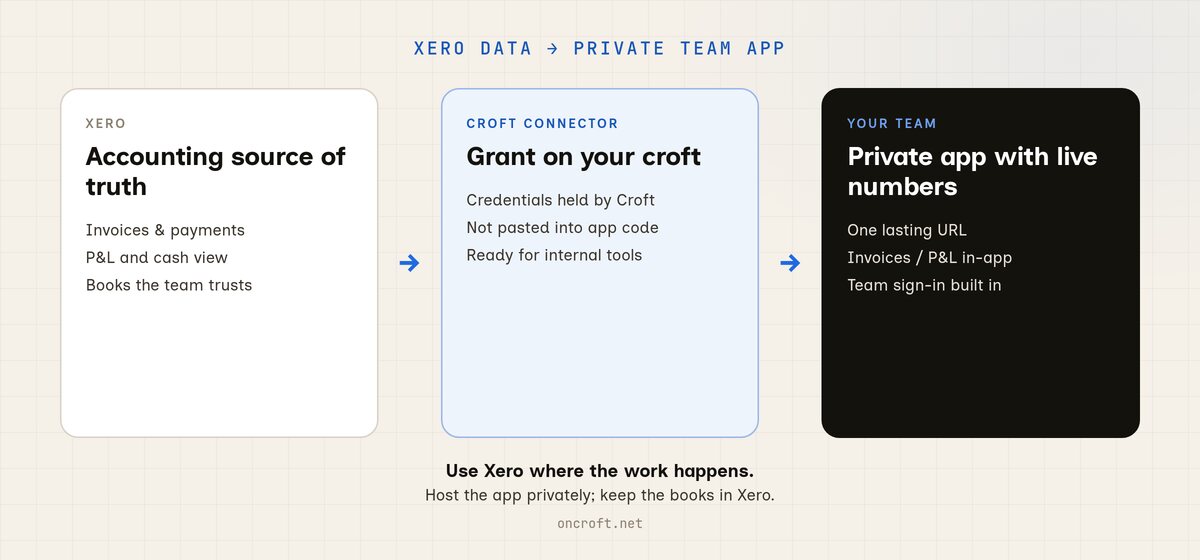
To use Xero data in an internal app your team can open, build the app on Croft, grant the Xero connector, and share one private URL. Colleagues sign in with company login, see live invoices or P&L in the app, and you keep improving it in chat. That is Xero data in a private team app: not a public host, not a spreadsheet export forever, and not credentials pasted into app code.
Xero already has the numbers. The team still needs an app.
Finance and accounts people live in Xero: invoices, payments, P&L, aged receivables. The books are fine. The cliff is building a small internal tool on top of that data and sharing it with the rest of the team.
What usually happens:
- You export CSVs into Excel. The export goes stale before the meeting ends.
- You email a Claude HTML artifact or a Cursor build. Nobody has a lasting link, and Xero credentials never belonged in that file anyway.
- You publish on a public host. Internal finance numbers sit on the open web unless you invent login and a secrets story yourself.
- You keep asking IT for a custom integration. The tool you needed this month waits in a backlog.
So Xero is the source of truth for the books. The team still does not have a private app that uses that data every day.
If your starting point is a spreadsheet model rather than live Xero, see Turn a spreadsheet financial model into a private team app. This post is the Xero-backed path.
What “connect Xero to an internal app” should mean
For invoices or P&L the team relies on, connecting Xero is not “any API call.” It is:
- A private app URL finance colleagues can open in a browser
- Xero credentials held by the platform, not scattered through app code
- Team sign-in, so outsiders cannot wander into the numbers
- A path to invoices, payments, and P&L the app can read when it needs them
- A way to keep iterating in chat, without babysitting servers
Related paths: Xero Sync template if you want a managed sync into your croft; the full connectors wall if you also need Stripe, Slack, or sheets later.
Export / public host / DIY API vs Croft
| Need | CSV / Excel export | Public AI-app host | DIY Xero API on a VPS | Croft |
|---|---|---|---|---|
| Live Xero invoices / P&L in an app | Stale files | You wire auth + secrets | You own login + ops | Connector grant |
| Private to your people | File chaos | You build login | You build login | Built in |
| Credentials off app code | N/A | Easy to leak in env files | Your problem | Held by Croft |
| Team opens one lasting URL | No | Public by default | Extra setup | Yes |
| Keep iterating with AI chat | Limited | Varies | Rare | Yes |
| No devops required | N/A | Sometimes | No | Yes |
Croft is the private place for vibe-coded and AI-built internal apps with connectors. It is not Vercel-style public AI-SaaS hosting, and it is not a sheet-backed low-code wrap. You bring the app idea; Croft gives the team a shared app on a private server and a Xero grant that stays off the codebase.
Steps: Xero data → private team app
- Get a croft (private server for your workspace).
- Connect Claude or Cursor over MCP, or use Croft Build in the browser if you prefer not to connect an assistant yet.
- Ask the assistant to build a private internal app that needs Xero data (invoice list, P&L view, cash dashboard, aged receivables). Deploy it to your croft.
- Grant the Xero connector to that app so credentials stay with Croft. Prefer the Xero Sync template when you want accounting data synced into the croft for other apps to query.
- Invite colleagues. They open a normal URL, sign in with company login, and work against the same live numbers.
- Keep chatting to change screens or queries. Deploys and rollbacks stay on the server.
More on the product path: From artifact to app. Prefer Cursor for the next iteration? See host a Cursor app. Ready-made starting points: templates. Broader connector list: connectors.
You still do not need to learn nginx, Docker, or “how to deploy.” The point of Croft is that the assistant can ship the app for you.
FAQ
How do I use Xero data in a private internal app?
Build the app on Croft, grant the Xero connector, and invite the people who should use it. They get a normal link and team sign-in. Details on artifacts to apps and connect Claude.
Can I put Xero invoices or P&L in a private team app?
Yes. That is the usual finance job: a small internal screen on top of books the team already trusts. Start from the connector page or the Xero Sync template.
Is this the same as exporting Xero to Excel?
No. Exports go stale and drift into emailed copies. A private app on Croft reads through the connector when someone opens it, so the team shares one place instead of another spreadsheet drop.
What about putting the app on a public host?
Public hosts are strong for public products. For internal Xero numbers you usually want a private server and team sign-in by default, not a public URL you lock down after the fact. See also Where to host a vibe-coded app so it stays private.
Do credentials live in my app code?
No. On Croft the Xero grant is held by the platform and attached to the app. You do not paste client secrets into the vibe-coded project for day-to-day use.
Do I need to be technical?
No. If you already use Xero and can describe the screen you want (invoices due, P&L by month, cash view), you can ask an assistant to build it on Croft. The people who get the most from this are finance and accounts experts, not platform engineers.
How much does Croft cost?
Solo from $24/month on annual billing, Team $99/month on annual. 7-day free trial, no card to start. See pricing.
Stake out your croft.
Your team's first app could be live before lunch.
Get your croft7 days free, no card to start. From $24/month - cancel anytime and take everything with you.