Blog · November 1, 2026 · Rich Chetwynd
How do I connect ChatGPT to Stripe?
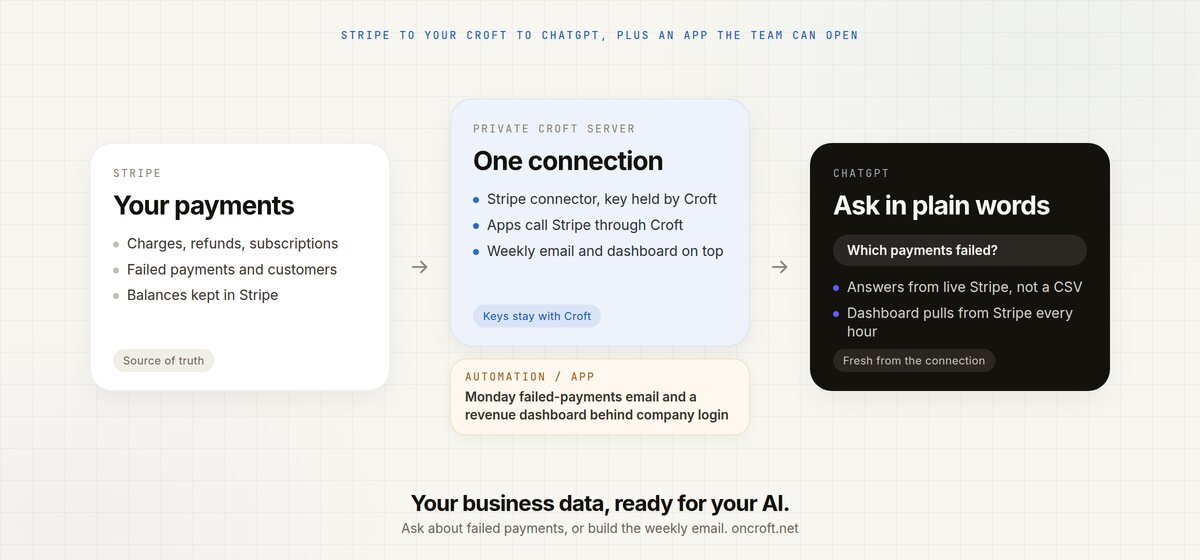
Connect ChatGPT to Stripe without exporting CSVs or handing over your key. Croft holds the Stripe connection. Ask ChatGPT to report on revenue, failed payments, refunds and churn, or to build a weekly email and a revenue dashboard the team opens behind company login.
Quick answer
To connect ChatGPT to Stripe, connect Stripe on Croft, then connect ChatGPT. Croft holds your Stripe key. ChatGPT never sees it. You can ask ChatGPT about your Stripe data in plain words, or ask it to build a weekly failed-payments email and a small revenue dashboard the team opens behind company login. You do not export a CSV into chat, and you do not paste a Stripe key into a prompt.
That is the site’s pitch in one job: your business data, ready for your AI, including the integrations you build on top of it.
Stop exporting Stripe reports into chat
The payments already live in Stripe. The usual ways of getting ChatGPT to talk about them are a poor fit:
- You export charges, refunds or subscriptions to a spreadsheet, then paste the file into ChatGPT. The numbers are already old. Next week you do it again.
- You drop a Stripe secret key into a prompt so the model can “just fetch it.” The AI is now holding credentials it should never see.
- You click around the Stripe dashboard and screenshot MRR or a failed charge. Nobody else on the team can ask a follow-up, and nothing runs on Monday morning unless you remember.
Finance people and developers hit the same wall. The data is fine. ChatGPT cannot see a current, controlled path to it, and there is nowhere to hang a weekly email or a revenue screen next to that path.
Related: stop exporting spreadsheets to ChatGPT if you are tired of pasting CSVs in general, and how to ask Claude about your Xero data if the job is the books. There is also how to connect an AI-built app to Stripe for the key-handling pattern on its own.
CSV export vs Stripe dashboard vs Croft
| Need | Export a Stripe CSV into ChatGPT | Stripe dashboard | Croft + ChatGPT |
|---|---|---|---|
| Current revenue, failed payments, refunds | Stale the moment you export | Live, if you click through | Apps pull live Stripe through Croft |
| Named job the AI can run | You hope the columns make sense | You read the screens yourself | Refund app, subscription dashboard, payment links |
| Says how the numbers were fetched | No | Whatever Stripe shows right then | Live Stripe data, for example a dashboard that pulls every hour |
| Keys stay off the AI | The file still left Stripe | You are logged into Stripe | Croft holds the connection |
| Who on the team can ask or open the report | Whoever has the file | Whoever has a Stripe login | Admins decide per connector and app |
| Same answers in Claude or Cursor | Paste the file again | Another Stripe login | One connection, many assistants |
| Then do the work (weekly email, dashboard) | Manual | Manual | Your AI builds a small app on Croft |
Croft is not “connect ChatGPT straight to Stripe.” ChatGPT talks to Croft. Croft holds the Stripe connector. Apps call Stripe’s payment API through Croft’s gateway, which checks permissions and adds the key on the way out. Setup: connectors, your data.
Xero and Google Search Console already keep a tidy copy on your server that your AI can query, with a “synced 12 minutes ago” note. Stripe on Croft is the live payments connector: process payments, check balances, manage subscriptions. The data page lists Stripe as the payments example (customers, subscriptions, charges, refunds). Each connector page says what that tool brings in.
Steps: connect Stripe, connect ChatGPT, ask
- Start a free trial to get a croft, your private server. 7 days, no card.
- Connect Stripe. Add the connector and paste your key, or ask your assistant “connect our Stripe account.” The key is held by Croft, encrypted, and never shown to apps. Connecting lets team apps process payments, check balances and manage subscriptions through Croft’s gateway. One connection can be shared across the apps you allow. All calls are audited. A sensitive connector can sit behind an admin’s approval.
- Connect ChatGPT. Copy the connection link from
Connect an AI assistant in your croft (it looks like
https://mcp.oncroft.net). In ChatGPT, turn on Developer mode under Settings, then Plugins (Plus or better). Add a plugin named Croft, set the connection URL to the link you copied, create it, click Connect, and sign in. If you are asked about tool permissions, choose Always allow. Claude, Cursor and Grok use the same kind of link. Developers can point a coding assistant at the same croft. - Ask. ChatGPT can list the sources you are allowed to see and build on the Stripe connection. Typical first jobs are the ones on the Stripe page: a refund approval app, a subscription health dashboard, or payment links for custom invoices.
The connection is MCP, so any assistant that speaks it can use the same croft. The AI does not log into Stripe. Company login sits in front of the apps you build, so teammates open the dashboard or the failed-payments list without a separate Stripe login.
Questions to ask ChatGPT
These cover connect ChatGPT to Stripe, ask ChatGPT about my Stripe data, Stripe data in ChatGPT, and AI failed payments report Stripe:
- Build a subscription health dashboard showing MRR, churn, and upcoming renewals from Stripe.
- Which payments failed this month, and which customers do we need to chase?
- Build a refund approval app so support can request refunds and finance can approve them.
- Every Monday, email me the list of failed payments.
- Show refunds this month and who they belong to.
- Let ops generate one-time payment links for custom invoices, without a full Stripe login.
Ask follow-ups in the same chat. ChatGPT stays on your croft, so you are not attaching another spreadsheet. Claude can ask for the same jobs once it is connected.
Everyone’s AI also shares team memory. Tell ChatGPT “remember for the team: refunds over $500 need Sam’s approval” and Claude knows it too.
Build on it: weekly email and a revenue dashboard
Asking is half of it. The other half is building on that connection: small apps and automations that use Stripe through Croft, with the key still held by Croft.
Ask your AI for jobs like these (they match the examples on the Stripe connector page):
- A weekly email of failed payments, with the customers behind each one. It can run every Monday from integrations and automations.
- A subscription health dashboard that shows MRR, churn and upcoming renewals, pulled from Stripe every hour, so finance can open a screen instead of a chat.
- A refund approval app where support requests a refund and finance approves it, all backed by live Stripe data.
The app uses your connectors without seeing the keys, can run on a schedule, and offers actions anyone’s connected assistant can run from then on. Actions that delete or cannot be undone ask first, and every run is logged with who asked and which AI did it. You can open the app, read it and change it. It sits on your private server, behind the same company login.
That is the equal half of the product: a Stripe connection ChatGPT, Claude, Cursor or Grok can use, and a place those assistants can build the email, dashboard and refund tool on top of it.
FAQ
How do I connect ChatGPT to Stripe?
You do not point ChatGPT at Stripe. Connect Stripe to Croft, then connect ChatGPT to Croft. ChatGPT Plus or better is required. The key stays with Croft. Start from your data.
Can I ask ChatGPT about my Stripe data?
Yes. Ask it to work from live Stripe through Croft, or to build a subscription health dashboard, a refund approval app, or a weekly failed-payments email. You do not export a CSV.
How do I get Stripe data in ChatGPT?
Connect Stripe to Croft, then connect ChatGPT as a custom MCP server. ChatGPT uses that connection. It never sees the key.
Can AI report failed Stripe payments?
Ask ChatGPT to build a small app that lists failed payments and which customers they belong to. The same app can email that list every week. Details: automations.
Why not export Stripe CSVs into ChatGPT?
Exports go stale and multiply as files. Croft holds one Stripe connection. ChatGPT reads and builds on that.
Should I give ChatGPT my Stripe key?
No. Croft holds the connection. The AI never sees a password or API key.
Who can see our Stripe data?
Admins can require approval before a specific app or person uses a sensitive connector. Company login sits in front of the apps you build.
Can Claude see the same Stripe connection?
Yes. Connect Claude the same way. Cursor and Grok work too. Each assistant uses the sources you have allowed.
Can ChatGPT email failed payments every Monday?
Ask it to build that job as a small app on Croft. Details: automations. The same connection can power a revenue dashboard.
How much does Croft cost?
Solo from $24/month billed annually, Team $99/month billed annually, Enterprise custom. 7-day free trial, no card to start. See pricing.
Start free trial → · Stripe connector → · Connect ChatGPT → · Your data → · Pricing →
Start your free trial.
Your team's first app could be live before lunch.
No card. 7 days. Cancel anytime.