Blog · October 30, 2026 · Rich Chetwynd
How to get Claude to read your Google Search Console data
Get Claude to read your Google Search Console data without exporting CSVs. Croft keeps a tidy copy of clicks, queries and pages on your private server. Ask why traffic dropped, or build a weekly lost-clicks email and a content dashboard on that same copy.
Quick answer
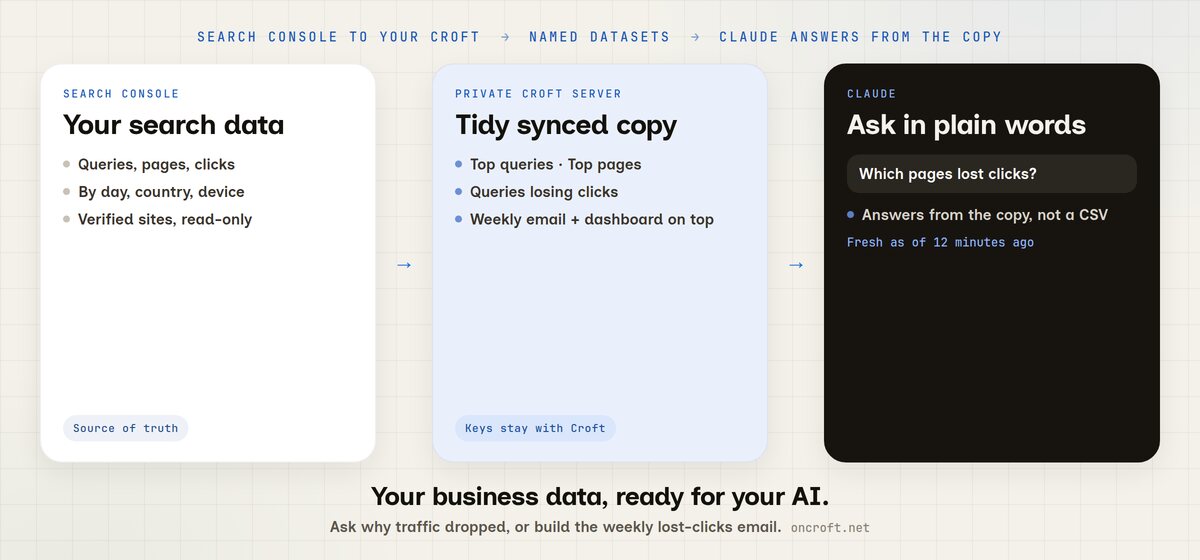
To get Claude to read your Google Search Console data, connect Search Console on Croft. Croft keeps a tidy, current copy of search data by day, query, page, country and device on your own private server. Connect Claude, then ask which pages lost clicks, or ask it to build a weekly lost-clicks email and a content dashboard on that same copy. You do not export a CSV into chat, and Google tokens never reach the AI.
That is the site’s pitch in one job: your business data, ready for your AI, including the integrations you build on top of it.
Stop exporting Search Console into chat
The clicks already live in Search Console. The usual ways of getting an AI to talk about them are a poor fit:
- You export queries or pages to a spreadsheet, then paste the file into Claude or ChatGPT. The numbers are already old. Next week you do it again.
- You give an assistant a path to your Google login, or hook a plugin that queries Search Console live. Every answer then waits on Google answering right then, and tokens may sit with the plugin instead of with you.
- You screenshot a Search Console chart. Nobody else on the team can ask a follow-up, and nothing runs on a Monday morning unless you remember.
Marketers and developers hit the same wall. The data is fine. The AI cannot see a current, controlled copy of it, and there is nowhere to hang a weekly email or a ranking dashboard next to that copy.
Related: how to ask Claude about your Xero data if the job is the books, and stop exporting spreadsheets to ChatGPT if you are tired of pasting CSVs in general.
Export vs a live plugin vs Croft
| Need | Export Search Console CSVs into chat | A plugin that queries Search Console live | Croft synced copy |
|---|---|---|---|
| Current clicks and queries | Stale the moment you export | Live, if the call succeeds | Tidy copy on your private server |
| Named tables the AI can read | You hope the columns make sense | Usually the raw Search Console rows | Top queries, Top pages, Queries losing clicks |
| Browse it yourself | The spreadsheet | In Search Console | Data page on your croft |
| Says how fresh the numbers are | No | Whatever Google returns right then | Yes, for example “synced 12 minutes ago” |
| Tokens stay off the AI | The file still left Search Console | Depends on the plugin | Croft holds the Google tokens |
| Who on the team can ask | Whoever has the file | Whoever connected the plugin | Admins decide per source |
| Same answers in ChatGPT or Cursor | Paste the file again | Another plugin | One copy, many assistants |
| Then do the work (weekly email, dashboard) | Manual | A separate build, still talking to Google | Your AI builds a small app on Croft |
Croft is not “connect Claude straight to Search Console.” Claude reads the curated copy on your server. It never sees a password or token. Setup: Google Search Console connector, your data, connectors.
Steps: connect Search Console, connect Claude, ask
- Start a free trial to get a croft, your private server. 7 days, no card.
- Connect Google Search Console. Sign in to Google with read-only access to your verified sites. Connecting starts the sync. Croft keeps search data by day, query, page, country and device as named datasets you can browse: Top queries, Top pages, Queries losing clicks. New sources are visible to admins until you open them to the team or to named people. You choose how much history to keep. Search Console itself keeps about 16 months, and Croft can keep what you ask for.
- Connect Claude. Add Croft as a connector in Claude and connect. The Claude free plan works. ChatGPT (Plus or better), Cursor and Grok use the same kind of link. Developers can point a coding assistant at the same croft.
- Ask. Claude lists the sources you are allowed to see, reads the Search Console datasets, and tells you when they were last synced. Use Sync now on the Data page when you want a fresh pull before a meeting.
The connection is MCP, so any assistant that speaks it can query the same copy. The AI does not log into Google. Company login sits in front of the croft, so teammates open the Data page and any apps you build without a separate Search Console login.
Questions to ask Claude
Use the same prompts the Data page suggests, then go further. These cover Search Console data in Claude, connect Claude to Google Search Console, and ask Claude why my search traffic dropped:
- Which pages lost the most clicks this month, and why might that be?
- What are our top 20 search queries over the last 28 days?
- Which queries get lots of impressions but few clicks?
- Which pages lost clicks?
- Which queries lost clicks, and on which pages?
- Show clicks, impressions and position for our top pages.
Ask follow-ups in the same chat. Claude stays on the synced copy, so you are not attaching another spreadsheet. ChatGPT can ask the same questions once it is connected.
Everyone’s AI also shares team memory. Tell Claude “remember for the team: search reports go to Ana every Monday” and ChatGPT knows it too.
Build on it: weekly email and a content dashboard
Asking is half of it. The other half is building on that copy: small apps and automations that use the same Search Console data, with the keys still held by Croft.
Ask your AI for jobs like these (they are the examples on the Search Console connector page):
- A weekly email of pages that lost the most clicks, with the queries behind each drop. It can run every Monday from integrations and automations.
- A content dashboard that ranks pages by clicks, impressions and position, so marketing can open a screen instead of a chat.
- A flag for high-impression, low-click queries, so you know which titles and descriptions to rewrite.
The app uses your connectors without seeing the keys, can run on a schedule, and offers actions anyone’s connected assistant can run from then on. Actions that delete or cannot be undone ask first, and every run is logged with who asked and which AI did it. You can open the app, read it and change it. It sits on your private server, behind the same company login as the Data page.
That is the equal half of the product: a current copy of Search Console for Claude, ChatGPT, Cursor or Grok to query, and a place those assistants can build the email, dashboard and rewrite list on top of it.
FAQ
How do I get Claude to read my Google Search Console data?
Connect Search Console on Croft so a tidy copy of search data stays in sync on your private server. Connect Claude, then ask in plain words. Claude reads that copy and tells you when it was last synced. Start from your data.
How do I connect Claude to Google Search Console?
You do not point Claude at Search Console. Connect Google Search Console to Croft, then connect Claude to Croft. Claude reads the synced copy. Google tokens stay with Croft.
Can ChatGPT see Search Console data too?
Yes. Connect ChatGPT the same way. Cursor and Grok work too. Each assistant sees the sources you have allowed.
Why did my search traffic drop, using AI?
Ask “Which pages lost the most clicks this month, and why might that be?” Croft already has Queries losing clicks, plus Top queries and Top pages.
Which pages lost clicks?
Ask that as a follow-up, or start with the monthly lost-clicks prompt above. The same copy can feed a weekly email of pages that lost the most clicks.
Why not export Search Console CSVs into Claude or ChatGPT?
Exports go stale and multiply as files. A Croft copy stays current, sits on your server, and the AI says how fresh it is.
Should I give an AI my Google login?
No. Croft holds the connection. The AI never sees a password or token.
Who can see our Search Console data?
Admins first. An admin can open the source to everyone or to named people. Your AI follows the same rule. Company login sits in front of the croft.
Can Claude email pages that lost clicks every week?
Ask it to build that job as a small app on Croft. Details: automations. The same copy can power a content dashboard.
How much does Croft cost?
Solo from $24/month billed annually, Team $99/month billed annually, Enterprise custom. 7-day free trial, no card to start. See pricing.
Start free trial → · Search Console connector → · Connect Claude → · Your data → · Pricing →
Start your free trial.
Your team's first app could be live before lunch.
No card. 7 days. Cancel anytime.