Blog · October 27, 2026 · Rich Chetwynd
Where can you host side projects and team tools without a PaaS?
Where to host side projects privately, and how to host an internal tool without a PaaS: put the app on Croft next to synced business data, then the team opens it behind company login. A Railway alternative for internal tools.
Quick answer
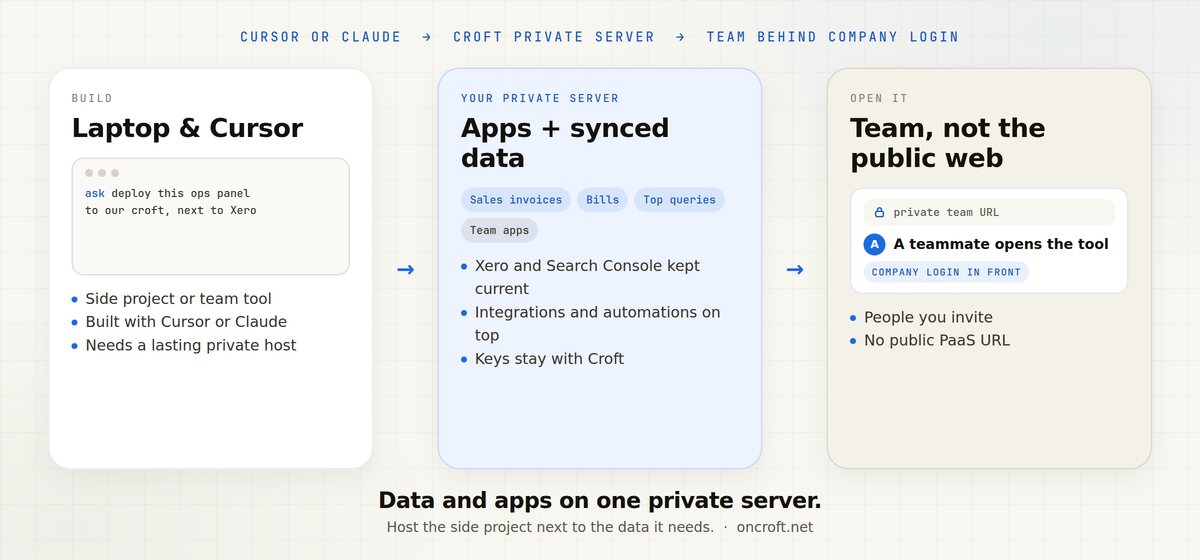
To host side projects privately and host an internal tool without a PaaS, put both the data and the apps on a private team host, not a public Railway, Render, or Vercel URL. Croft is that host: a current copy of your business tools on your own private server, plus the side projects, team tools, integrations, and automations you build next to it. Build in Cursor or Claude, deploy to the croft, and the team opens a lasting URL behind one company login. No public PaaS to lock down, no VPS to babysit.
That is private hosting for small team tools, and the usual Railway alternative for internal tools, when the audience is your company rather than the open web.
The cliff is not “can we build it”
Cursor, Claude, and similar assistants make a useful internal tool in an afternoon: an ops panel, an approvals queue, a roster, a tracker, a small admin UI. Side projects at work look the same. They are real software the team needs. The next question is where it lives.
What people try first, and why it is a poor fit for a private team tool:
- A public PaaS. Railway, Render, and Vercel get a live URL fast. The default posture is internet-facing. Privacy, who can open it, and often a database are extra work you own.
- A DIY VPS. You can harden nginx. You also own SSL, auth, backups, and every next internal tool.
- A laptop demo. Fine for five minutes. The tool dies when the machine sleeps, and you are the server.
Developers hit this after shipping something the company actually uses. They want a place for small team projects without Railway/Render/Vercel-style infra. Non-developers hit the same cliff when the assistant built something useful and there is no lasting place colleagues can open. Croft is for that team job, not a substitute for people who “cannot code.”
This post is the where decision for side projects and team tools when you do not want a public PaaS. Adjacent hosting choices: How to share an internal tool without a public URL, Croft vs Railway for private team apps, and Where to host a Cursor vibe-coded app for your team.
Two things that should live on the same server
A private team tool is only half the story if the numbers it needs still live in someone else’s export. Croft gives equal weight to both:
1. Your business data, connected and kept current. Connect the tools you already run. Xero comes in as Sales invoices, Bills, Contacts, and Payments. Google Search Console comes in as Top queries, Top pages, and Queries losing clicks. That tidy copy lives on the team’s own private Croft server. You choose how much history to keep. New sources start visible to admins. Claude, ChatGPT, Cursor, and Grok query it over MCP and say when it was last synced. Credentials stay with Croft. The AI never sees a password or API key, and it does not log into your tools.
2. The apps, integrations, and automations you build on top of it. The side project or team tool deploys to the same croft, next to the data it needs. Apps call connectors through Croft’s gateway, so keys never sit in generated code. When you want something done, not only shown, ask the assistant to build a small app: email the overdue list every Monday, or a weekly search-drop report. Those jobs can run on a schedule. Destructive actions ask first, and every run is logged.
The developer path is short: build with Cursor or Claude, put it on Croft next to the data, invite the team, they open it behind company login. You do not run infra for each tool.
Setup for asking from chat: connect Claude. Cursor-focused landings: for developers and host a Cursor app.
Public PaaS vs DIY VPS vs Croft
| Need | Public PaaS (Railway, Render, Vercel) | DIY VPS | Croft private team host |
|---|---|---|---|
| Default posture | Public URL by default | You harden it | Private by default |
| Who can open it | Anyone with the link unless you lock it down | Whoever you expose | People you invite, behind company login |
| Business data next to the app | You wire APIs, keys, and often a second database | You install and back it up | Synced copy on the same private server |
| Apps, integrations, automations | You assemble hosting, jobs, and auth | You own cron, nginx, SSL | Deploy from Cursor or Claude; schedules included |
| Upkeep for a team tool | You own privacy, auth, often a DB | You own the box | Backups and rollback included |
This is posture, not a peer feature checklist. Public PaaS hosts shine when the app faces the internet. A VPS is for when you want full ops control. Croft is private hosting for small team tools: data and apps on one server the team already signs into. See Croft vs Railway and the blog comparison. Croft has no CLI. Deploys go through the Croft MCP connector from the assistant.
When a public PaaS is the right call
Pick Railway, Render, or Vercel when:
- The app is meant for customers or the public internet
- You want preview deploys and classic product hosting
- You are happy operating privacy, auth, and data yourself as it grows
That is a strong job. It is the wrong default when you need to host an internal tool without a PaaS and only your company should use it.
When Croft is the right call
Pick Croft when:
- The side project or team tool is for your people, not the open web
- You want where to host side projects privately answered with one company login, not a public URL you lock down later
- The tool should sit next to current business data (Xero, Search Console, and the other connectors you allow)
- You would rather build in Cursor or Claude and deploy than stand up a public PaaS or a VPS for every internal app
Typical path:
- Start a free trial to get a croft, your private server. 7 days, no card.
- Connect the tools you already run. Start with Xero or another source from connectors. New sources are admin-only until you open them.
- Connect your assistant: Claude, Cursor, ChatGPT, or Grok. Ask it to deploy the app to your croft, next to that data.
- Invite colleagues. They open a normal URL, sign in with company login, and use the tool.
More on that path: for developers, host a Cursor app, integrations and automations. Pricing: pricing.
FAQ
Where can you host side projects and team tools without a PaaS?
On a private team host, not a public Railway, Render, or Vercel-style URL. Croft keeps a current copy of your business data on your own server and hosts the apps you build next to it. The team opens everything behind one company login.
Where do you host side projects privately?
Host them on Croft when they are for the team. Lasting private URL, synced data, no public PaaS to operate. See for developers.
How do you host an internal tool without a PaaS?
Build it in Cursor or Claude, deploy it to your croft, invite colleagues. Details: host a Cursor app.
Is Croft a Railway alternative for internal tools?
Yes, when the job is a private team tool. For internet-facing services, Railway remains the better fit. See Croft vs Railway and Croft vs Railway for private team apps.
Does the team tool sit next to our business data?
Yes. Connect Xero or Google Search Console. Claude, ChatGPT, Cursor, and Grok query that copy. Apps on the same croft use connectors without holding the keys.
Do you need to run servers or a VPS?
No. Croft is the private server. You do not become ops for every side project.
Can non-developers on the team use what we ship?
Yes. Developers build and deploy. Everyone else signs in with company login and uses the app.
How much does Croft cost?
Solo from $24/month billed annually, Team $99/month billed annually, Enterprise custom. 7-day free trial, no card to start. See pricing.
Start free trial → · For developers → · Host a Cursor app → · Connect Claude → · Connectors → · Pricing →
Start your free trial.
Your team's first app could be live before lunch.
No card. 7 days. Cancel anytime.