Blog · September 17, 2026 · Rich Chetwynd
Deploy a Cursor app for your company (private, with company login)
How to deploy a Cursor app privately for your team: full-stack with a database included, company login across apps, backups and rollback. Not a public Vercel preview.
Quick answer
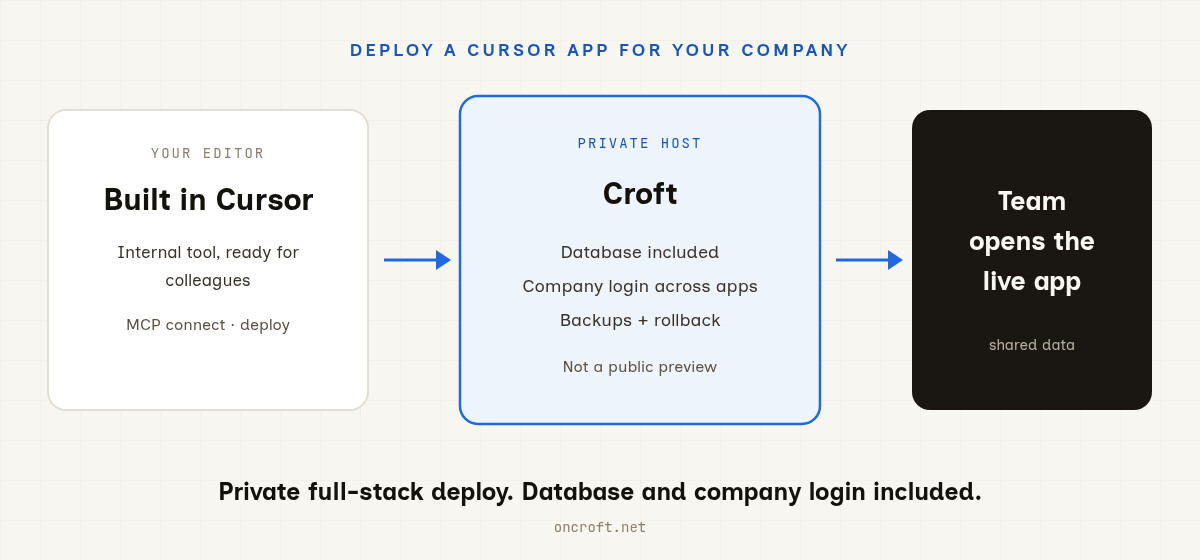
To deploy a Cursor app privately for your company, connect Cursor to Croft over MCP, deploy to your private server, and invite colleagues behind company login. You get a full-stack app with a database included, backups, and rollback. You do not need a separate Postgres product or a DIY auth stack for a typical internal tool.
That is the path when search says host Cursor app for team, Cursor internal tool deploy, or Cursor vs Vercel for internal apps: private host first, public preview host second.
The cliff after vibe-coding
Developers at companies can already ship useful internal apps in Cursor. Build is easy. The cliff is:
- A place that is private, not a public preview anyone can guess
- Company login so only the right people open it
- A database so data persists for everyone, not one browser
- Backups and rollback when the next AI edit goes wrong
Public hosts are excellent when the app is meant for the open web. They are the wrong default for an approvals queue, ops panel, hiring tracker, or roster your colleagues open every day.
Steps: Cursor → private company deploy
- Get a croft (private server for your workspace).
- Connect Cursor over MCP (Add to Cursor, authenticate).
- Build or refine the internal app in Cursor, then ask the agent to deploy to your croft. Croft Build is optional if you prefer the browser.
- Invite colleagues. They open a normal link, sign in with company login, and work against shared data that persists.
End-to-end landing page: host a Cursor app. Broader eng context: Croft for developers. Many apps on one floor: software factory.
Cursor vs Vercel for internal apps
| Need | Vercel (and Cursor to Vercel) | Croft |
|---|---|---|
| Public / preview deploys | Strong fit | Not the primary job |
| Private internal tool | You assemble privacy, auth, and often DB | Private server by default |
| Database for the app | Separate product / wiring | Included with the host (SQLite / app DB) |
| Many internal apps, one login | Per-project setup | Many apps on one server, one company login |
| IdP in front of deploys | Vercel Passport can do this | Company login is part of the host |
| Backups + rollback for team tools | Platform-dependent | Built in |
Vercel is strong for public and preview deploys. Vercel Passport can put your IdP in front of deployments. Croft is built for internal tools: full-stack apps including a database with no extra database setup, many private apps on one server behind one company login, plus backups and rollback. Lead with host and deploy for the team tool; company login is the access benefit.
What you should expect after deploy
- A shared live URL your colleagues open, not emailed HTML
- Saved data on your private server
- Access per app under one company login
- Room to iterate: change in Cursor, redeploy, roll back if needed
FAQ
How do I deploy a Cursor app privately?
Connect Cursor to Croft over MCP, deploy to your private croft, and invite the people who should use it. Details on host a Cursor app and connect Cursor.
Do I need a separate database?
No for a typical internal tool. Croft includes the app database with the deploy. You are not provisioning Postgres or wiring a Vercel database product just to save rows.
How is this different from Vercel + Passport?
Vercel shines for public and preview deploys; Passport can front deployments with your IdP. Croft is private full-stack hosting: database included, many apps on one server behind company login, backups and rollback built in. Different job than “public host plus auth.”
Can I use Codex or VS Code too?
Croft connects over MCP. That path works today with Cursor, Claude, and ChatGPT (and other MCP clients). GitHub Copilot in VS Code has its own connect guide. If your tool speaks MCP, point it at your croft. You can also use Croft Build without an editor MCP.
How much does Croft cost?
Solo from $24/month on annual billing, Team $99/month on annual. 7-day free trial, no card to start. See pricing.
Start your free trial.
Your team's first app could be live before lunch.
No card. 7 days. Cancel anytime.