Blog · October 21, 2026 · Rich Chetwynd
How to share a leave tracker app with your team
Host a leave tracker built with AI as a private team app on Croft. One URL for requests, approvals, balances and the team calendar, with company login and backups. Not an emailed spreadsheet or a public host.
Quick answer
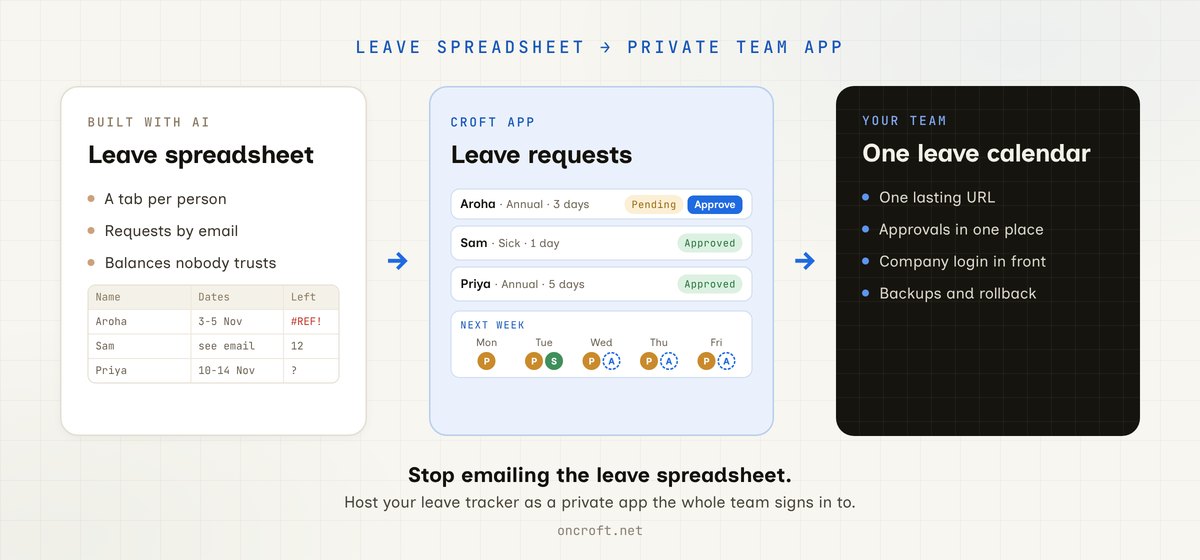
To share a leave tracker with your team, host it as a private app on Croft and give everyone one URL. People request time off, managers approve or decline it in the same app, and the whole team sees the same calendar and balances, with everyone signing in through company login. That is the path for an annual leave tracker built with AI and for moving a leave spreadsheet to a private app for the team: one lasting app on a private server, not a shared sheet anyone can overwrite, a thread of calendar invites, or a public host.
The tracker works for you. Sharing it is the hard part.
Most teams start leave tracking in a spreadsheet: a row per request, a tab per person, a formula for days left. Plenty of managers and ops leads now ask Claude or Cursor to turn that sheet into a proper tracker: a request form, an approval queue, a calendar of who is away, and balances that update on their own. It works well for the person who built it. Then the whole team needs it.
What usually happens:
- The leave spreadsheet stays shared. Someone sorts a column, a formula breaks, and nobody trusts the balances any more.
- Requests arrive by email or chat, then someone copies them into the sheet. Approvals live in an inbox, not next to the request.
- The AI-built tracker runs on one laptop, or as an HTML file you can email. Each person gets a snapshot, and nothing they enter is saved for anyone else.
- You put it on a public host. Names, dates and leave types sit on the open web unless you build login yourself.
- You look at an HR suite. It does leave, plus payroll, reviews and a per-person price, when you wanted one clear tool that matches how your team books time off.
So the tracker is useful. The team still does not have one place to request, approve and see leave.
Related people and ops posts: share an onboarding checklist, share a shift roster, and share a hiring tracker. This post is the leave and time-off path.
What sharing a leave tracker should mean
For a tool everyone uses a few times a year and every manager uses every week, “share it” is not “any live URL.” It means:
- A lasting URL everyone can bookmark and open in a browser
- One record of leave: the same requests, approvals and balances for everyone, saved in the app’s database
- Requests and approvals in one place, so “did you see my request?” is answered by the app, not an inbox
- A team calendar that shows who is away next week without asking around
- Team sign-in, so only your people see names, dates and leave types
- Backups and a way to undo a bad edit or a wrong import
- A path to keep improving it in chat (public holidays, a carry-over rule, part-time balances) without managing servers
Recoverability matters for records like this: App hosting with backups and versioning.
Shared spreadsheet vs HR suite vs spreadsheet tools vs Croft
| Need | Shared leave spreadsheet | HR suite with a leave module | Spreadsheet-to-web and sheet-backed low-code tools | Croft private app |
|---|---|---|---|---|
| Starting point | The sheet you have | The vendor’s leave workflow | Your workbook, or a model in the vendor’s editor | The tracker you built with AI, or the Leave template |
| Leave rules that match your team | Formulas you maintain | Configured within the product’s options | Formulas or a visual builder | Whatever you ask your AI to build |
| Request and approve in one place | Email, then copy into the sheet | Yes | Depends on the build | Yes, in the app |
| One record for everyone | Until someone edits a formula | Yes | Yes, often still tied to the sheet | Yes, one app database |
| Private to your people | Depends on sharing settings | Yes | Varies by product and plan | Private server, company login |
| Keep changing it in Claude or Cursor | No | No | Limited | Yes |
| Cost shape | Free, plus the time it takes | Usually per person, bundled with other HR features | Varies | One flat plan for the team |
Spreadsheet-to-web tools such as SpreadsheetWeb and EASA are built to keep your Excel workbook as the engine and put a web front end on it. That suits a team that wants the workbook to stay the source of truth. Low-code platforms such as Mendix, and AI app builders such as Appaca, have you build inside their editor, often on a connected sheet or their own data model. Croft starts from the app your AI already built and gives it a private home your team can open. It is not a public app host, and it is not “keep the spreadsheet forever and wrap it.” More side-by-sides: compare Croft.
Your leave tracker, next to your team’s data
Croft is the private place your team’s business data lives. Connect a tool such as Xero and Croft keeps a tidy, up-to-date copy in sync on your own server, so Claude or ChatGPT can answer questions from it. See your data. A leave tracker sits on the same croft, next to that data and your other team apps, and picks up the same features:
- Team memory. Tell your assistant “remember for the team: leave over five days needs two weeks’ notice” and everyone’s AI, Claude or ChatGPT, knows the rule from then on.
- Actions your AI can run. Ask your AI to give the app actions such as “request leave” or “list who is away next week”. Anyone’s connected assistant can then run them, and every run is logged with who asked and which AI ran it.
- Connectors without keys in code. If you want a message when a request needs approval, the app can use a connector such as Slack without the key ever touching the app’s code.
Each app has its own SQLite database, with shared workspace data across your apps, so leave records are not trapped in one file on one laptop.
Steps: leave spreadsheet to private team app
- Start a free trial to get a croft, your private server.
- Connect Claude or Cursor, or use Ask Croft in the browser if you prefer not to connect an assistant yet.
- Bring the tracker: paste the artifact, share the spreadsheet’s columns, or start from the Leave template (requests with type and dates, pending, approved or denied, a team calendar and remaining balances). Ask the assistant to deploy the leave tracker as an app on your croft (not to email a file or publish a public URL).
- Import current balances and booked leave from the spreadsheet once, so the app starts from today’s numbers.
- Invite the team. People open a normal URL, sign in with company login, and request time off. Managers approve in the same app.
- Keep chatting to add public holidays, a carry-over rule, part-time balances, or a reminder when a request has waited too long. Deploys and rollbacks stay on the server.
More on the product path: From artifact to app and templates. Building in Cursor? See host a Cursor app and Croft for developers.
FAQ
How do I share a leave tracker with my team?
Host it as a private app on Croft and invite the team. Everyone gets one URL, the same calendar and balances, and one place to request and approve time off. See artifacts to apps and connect Claude.
How do I host a time-off tracker privately?
Deploy it to your croft instead of a public host. The app runs on a private server, everyone signs in with company login, and backups and rollback are included. Background: Where to host a vibe-coded app so it stays private.
Can I turn our leave spreadsheet into a private app for the team?
Yes. Share the columns and a few sample rows with Claude or Cursor, or start from the Leave template, ask the assistant to deploy it to your croft, then import current balances once.
Can I build an annual leave tracker with AI?
Yes. Describe your leave types, how balances accrue, who approves, and what the calendar should show. Claude or Cursor builds it, and Croft hosts it privately for the team. When the policy changes, ask for the change in chat.
Should we use an HR suite instead?
If you want payroll, reviews and leave in one vendor product, an HR suite is a sound choice. If you want one leave tool that matches how your team works, owned by you and changeable in chat, a private Croft app is lighter.
Who can see leave records?
Only people you invite to your croft can open the app, and they sign in with company login. On the Team plan, roles (admins, creators, members) control who can build and change apps.
Can Claude or ChatGPT answer “who is off next week?”
Yes, if the app has an action for it. Ask your AI to add one when it builds the tracker. After that, anyone’s connected assistant can run it, and each run is logged. Setup: connect Claude.
Can developers use the same path?
Yes. Developers use Croft when they want a private team tool without standing up a public hosting platform. See Croft for developers and host a Cursor app.
How much does Croft cost?
Team is $99/month billed annually, for up to 50 people with roles and permissions. Solo starts at $24/month billed annually. 7-day free trial, no card to start. See pricing.
Start free trial → · Leave template → · Your data → · Pricing →
Start your free trial.
Your team's first app could be live before lunch.
No card. 7 days. Cancel anytime.