Blog · November 9, 2026 · Rich Chetwynd
How do I give Claude and ChatGPT a shared memory for my team?
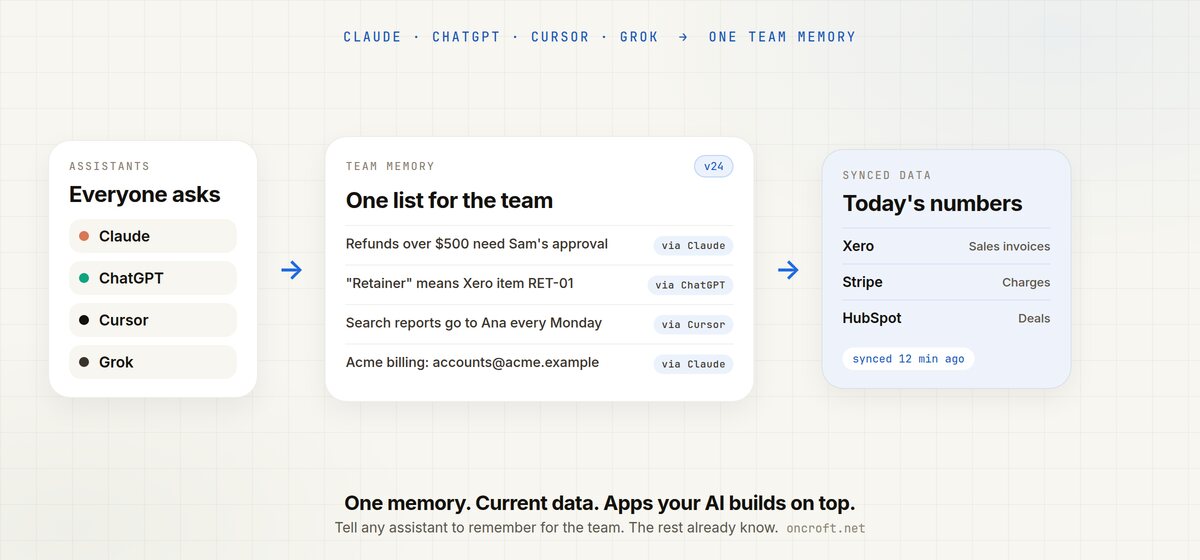
Give Claude and ChatGPT a shared memory for your whole team. One list on your private Croft server: tell any assistant to remember something and everyone's AI knows it, next to your synced business data and the apps they build on top.
Quick answer
To give Claude and ChatGPT a shared memory for your team, connect them to Croft. Tell any assistant remember for the team: refunds over $500 need Sam’s approval. That note lives on your private server. Claude, ChatGPT, Cursor, Grok, or any MCP assistant connected to the same croft can read it from then on. You can see every change, who made it and from which assistant, and restore an earlier version.
That is half of it. The other half is the tidy copy of your business tools sitting next to that list, so answers use today’s numbers and the apps your AI builds already know what the team means.
Personal chat memory is not a team memory
People already try to make an assistant “remember the business.” The usual places to put that knowledge are a poor fit for a team:
- Chat memory in one assistant. Useful for one person. What you tell Claude in your account does not show up in a teammate’s ChatGPT, or even in their Claude, unless they typed it too.
- Project instructions or a custom prompt. Fine for one product and one workspace inside that product. Another assistant, or a new hire’s account, starts from a blank page. You copy the text by hand and hope the copies stay in sync.
- A shared doc you paste into every chat. The file goes stale. Nobody can see which assistant last changed a rule, and nothing is restored if a bad edit lands.
Developers and everyone else hit the same wall. The facts exist. They are not in one place every assistant can read, next to the live numbers those facts refer to.
Related: how to ask Claude about your Xero data when the gap is current books, not only shared rules, and how to get AI to email overdue invoices every Monday when you want that shared context to run a job.
Personal assistant memory vs Croft team memory
| Need | Personal chat memory | Project instructions in one assistant | Croft team memory |
|---|---|---|---|
| One list for the whole team | No, it stays with that person | Only inside that product | Yes, on your private server |
| Claude and ChatGPT see the same notes | You copy them | You copy them | Connect both; they share the list |
| Cursor, Grok, any MCP assistant | Another paste | Another paste | Same croft, same memory |
| See who wrote it, and from which assistant | Not as a team log | Not as a team log | Yes |
| Restore an earlier version | Depends on the product | Depends on the product | Yes |
| Sits next to current Xero, Stripe, HubSpot | You paste a spreadsheet | You paste a spreadsheet | Synced copy on the same server |
| Says how fresh the numbers are | No | No | Yes, for example “synced 12 minutes ago” |
| Then do the work (draft an invoice, Monday email) | Manual | Manual | Your AI builds a small app on Croft |
| Keys stay off the AI | File still left the tool | File still left the tool | Croft holds the connection |
Croft is not “turn on memory in every chat product you use.” It is one team memory, plus the connected data, on a server that is yours. Setup: Croft for teams, your data, connectors.
Steps: trial, connect tools, connect AI, remember for the team
- Start a free trial to get a croft, your private server. 7 days, no card.
- Connect the tools you already run. Xero is the usual start for invoices and retainers. Stripe, HubSpot, Pipedrive, Attio, Square, Paddle, Google Search Console and others are on connectors. Connecting starts the sync. Croft keeps a tidy copy on your server, named like a spreadsheet: Sales invoices, Bills, Contacts. New sources are visible to admins until you open them to the team or to named people. Keys never reach the AI.
- Connect Claude and ChatGPT. Add Croft as a connector and connect. Cursor and Grok use the same kind of link. Developers can point a coding assistant at the same croft. You bring your own AI account. Croft does not meter tokens.
- In any of those chats, say: remember for the team: refunds over $500 need Sam’s approval. Add the words the team actually uses, such as “retainer” means the monthly fee in Xero item RET-01. Open another assistant and ask about retainers or refunds. It already has the note.
- When you want something done, not only remembered, ask for the app: Draft an invoice for Acme’s overdue retainer, or Every Monday, email me the list of overdue invoices.
The connection is MCP, so any assistant that speaks it can use the same croft. Company login sits in front of the croft, so teammates open the data and the apps without a separate login for each tool.
Equal halves: shared memory plus data, and the apps built on top
Shared AI memory for a team only pays off if the assistant also has the numbers those words point at.
On the memory and data side, Croft keeps one list everyone can see, next to the synced copy of your tools. When someone asks about a retainer, the assistant can use the team’s meaning (Xero item RET-01) and the current Sales invoices copy, and say when that copy was last synced. Admins decide who sees each source. Browse it yourself on your data.
On the apps and automations side, ask your assistant to build the job on that same context. From automations:
- It runs on a schedule or an event, on your private server.
- It can read, summarise and draft using your own Claude or OpenAI account (your subscription, not a resold one).
- It can email, alert or update an app when it finishes.
- You build it by asking in plain words. There is no per-automation fee.
- Destructive actions ask first, and every run is logged with who asked and which AI did it.
That is the equal half of the product: a shared memory and current data so answers are right for your business, and a place that AI can hang the invoice draft or the Monday overdue email on.
Tell Claude the retainer rule and ChatGPT can draft from it. Tell ChatGPT that refunds over $500 need Sam, and the refund app Claude builds already knows to ask. See every change, which assistant made it, and restore an earlier version if a note should not have landed.
FAQ
How do I give Claude and ChatGPT a shared memory for my team?
Connect them to Croft. Tell either assistant remember for the team: and the fact. The entry lives on your private server. Every connected assistant can read it. You can see who wrote it, from which assistant, and restore an earlier version. Start from Croft for teams.
How do I get shared AI memory for a team?
Put the memory on the team’s server, not in one person’s chat. Connect Claude, ChatGPT, Cursor or Grok. They share one list.
How do I share memory across Claude and ChatGPT?
Connect both to the same croft. A note added in one is visible in the other. You do not copy project instructions between products.
What is team memory for AI assistants?
A shared list of facts the whole team wants every assistant to know. It sits on your Croft server with a history of changes. It is not one person’s chat memory in a single assistant.
How do I make Claude remember things for my whole team?
Connect Claude, then say remember for the team: and the fact. Teammates’ other assistants pick it up. Personal Claude memory stays in that person’s Claude account.
Is Croft team memory the same as chat memory in Claude or ChatGPT?
No. Chat memory and project instructions in an individual assistant usually stay with that person and that product. Croft team memory is one list for the workspace, with a change log and restore.
Does team memory replace our Xero or Stripe data?
No. Memory holds the team’s words. Croft also syncs the tools into a tidy copy. The AI uses both, and says how fresh the data is.
Can the same shared memory power apps and automations?
Yes. Ask it to draft an invoice or to email overdue invoices every Monday. The app runs on Croft, uses the synced copy and team memory, and never sees the keys. Details: automations.
How much does Croft cost?
Solo from $24/month billed annually, Team $99/month billed annually, Enterprise custom. 7-day free trial, no card to start. You bring your own AI account. Croft does not meter tokens. See pricing.
Start free trial → · Croft for teams → · Connect Claude → · Connect ChatGPT → · Your data → · Connectors → · Automations → · Pricing →
Start your free trial.
Your team's first app could be live before lunch.
No card. 7 days. Cancel anytime.