Blog · November 11, 2026 · Rich Chetwynd
How do I deploy an app built with Claude Code so only my team can use it?
Deploy a Claude Code app privately for your team: host it on Croft, next to synced business data and shared team memory, then colleagues open it behind company login. Not a public Railway, Render, or Vercel URL.
Quick answer
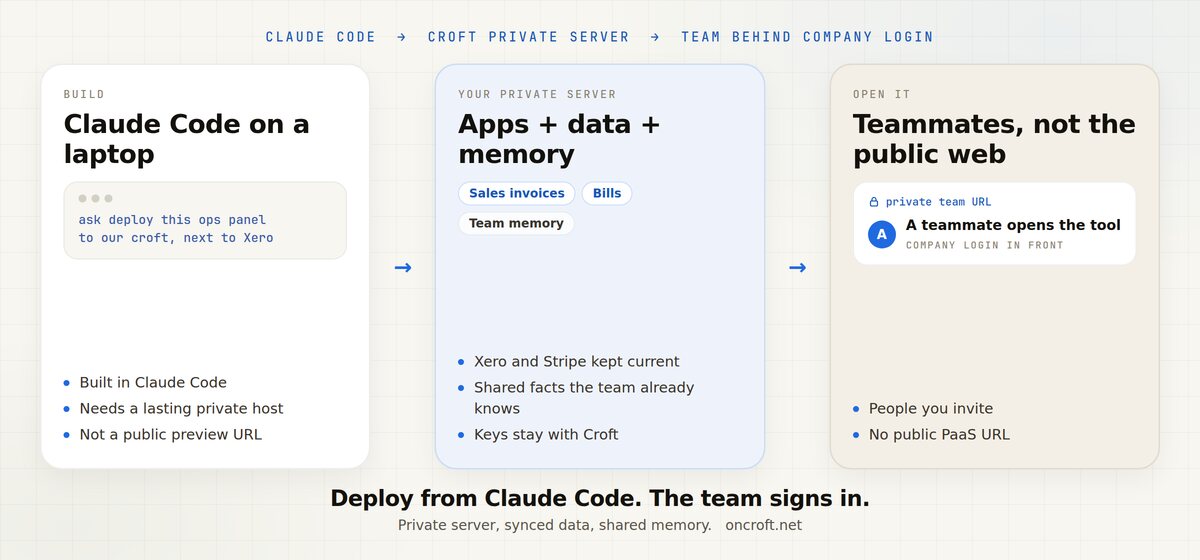
To deploy a Claude Code app privately for your team, put it on a private team host, not a public Railway, Render, or Vercel URL. Croft is that host: your own private server, the app next to synced business data and shared team memory, and teammates open a lasting URL behind one company login. Point Claude Code at Croft, ask it to deploy, and invite the people who should use it.
That is how you host a Claude Code app for your team and share a Claude Code project privately, without emailing files, locking down a public PaaS link, or becoming ops for a VPS.
You built it in Claude Code. Sharing it should not mean going public.
Claude Code makes a useful internal tool in an afternoon: an ops panel, an approvals queue, a roster, a tracker. It runs on your laptop. Then the team needs to open it, and the hosting cliff shows up.
What people try first, and why it is a poor fit for a staff-only app:
- Emailing a zip, a repo, or HTML. Each person has a snapshot. Nothing is shared, saved together, or updated in one place. The next change is another attachment.
- A public PaaS URL. Railway, Render, and Vercel get a live link fast. The default posture is internet-facing. Privacy and who can open it are extra work you own.
- A DIY VPS. You can harden the box. You also own SSL, login, backups, and every next internal tool.
Developers hit this after shipping something the company actually uses. They want a place for a Claude Code project without public-PaaS ops. Non-developers hit the same cliff when the assistant built something useful and there is no lasting URL colleagues can bookmark. Croft is for that team job, not a product for people who “cannot code.”
This post is the deploy decision for a Claude Code app when only your company should use it. Adjacent hosting choices: How to share an internal tool without a public URL and Where can you host side projects and team tools without a PaaS?. The same private-deploy pattern for Cursor is on host a Cursor app and Croft for developers.
Emailing files vs a public PaaS vs DIY VPS vs Croft
| Need | Email the files | Public PaaS (Railway, Render, Vercel) | DIY VPS | Croft private team host |
|---|---|---|---|---|
| Default posture | Copies on laptops | Public URL by default | You harden it | Private by default |
| Who can open it | Whoever got the attachment | Anyone with the link unless you lock it down | Whoever you expose | People you invite, behind company login |
| Lasting shared URL | No | Yes, usually public | If you set it up | Yes, private |
| Business data next to the app | A spreadsheet in the zip | You wire APIs and keys | You install and back it up | Synced copy on the same private server |
| Keep iterating in Claude Code | Another email | Another public deploy | You own the pipeline | Ask it to redeploy to the croft |
| Upkeep for a team tool | Drift between copies | You own privacy and login | You own the box | Backups and rollback included |
This is posture, not a peer feature checklist. Public PaaS hosts shine when the app faces the internet. A VPS is for when you want full ops control. Croft is a private team host: you bring the Claude Code app, the team gets one place to open it. See Croft vs Railway.
What “only my team” should mean
For an app built in Claude Code, “so only my team can use it” is not “hide a public URL.” It means:
- A lasting private URL colleagues can bookmark and reopen
- Private by default, not a public link you lock down later
- Team sign-in, so only your people open it (everyone signs in with the company login)
- Shared saved data, so everyone works against the same app, not emailed copies
- Room to keep iterating in Claude Code and redeploy without babysitting nginx or a public PaaS
Teammates do not need Claude Code, or even a Claude account, to use the app. Creators build and deploy. Everyone else opens the URL.
The app can sit next to the team’s data
A private deploy is only half the story if the numbers still live in someone else’s export. On Croft, the host and the data share one server.
Connected business data. Connect the tools you already run. Xero, Stripe, Google Search Console, and the rest are on connectors. Croft keeps a tidy copy on your private server, named like a spreadsheet: Sales invoices, Bills, Contacts. New sources start visible to admins. Claude Code can query that copy and say when it was last synced. Credentials stay with Croft. The app never holds the keys.
Shared team memory. Tell any connected assistant remember for the team: refunds over $500 need Sam’s approval. That list lives on the same croft. The app Claude Code deploys can use those words next to today’s numbers. See how to give Claude and ChatGPT a shared memory for your team.
The developer path stays short: build in Claude Code, deploy to the croft next to that data, invite the team. You do not run infra for each tool.
Steps: Claude Code to a private team host
- Start a free trial to get a croft, your private server. 14 days free.
- Connect the tools you already run, if the app needs current numbers. Start with Xero or another source from connectors. New sources are admin-only until you open them.
-
Point Claude Code at Croft. The usual developer path is the official plugin (tools plus the know-how to deploy). In Claude Code:
claude plugin marketplace add on-croft/agent-plugin
claude plugin install croft@croft
The other documented path: connect at claude.ai first. Claude Code shares those connectors, so Croft then shows up when you run
/mcp. Full agent setup: deploy with an AI agent. - In Claude Code, ask it to deploy the app to your croft (not a public host). Example: deploy this ops panel to our croft, next to Xero. Wait until it reports the deploy succeeded, then open the URL it returns.
- Invite colleagues. They open a normal URL, sign in with the company login, and use the tool.
You bring your own Claude account. Croft does not meter tokens. Pricing: pricing.
When a public PaaS is the right call
Pick Railway, Render, or Vercel when:
- The app is meant for customers or the public internet
- You want preview deploys and classic product hosting
- You are happy operating privacy, login, and data yourself as it grows
That is a strong job. It is the wrong default when you need to deploy a Claude Code app privately for your team and only your company should use it.
When Croft is the right call
Pick Croft when:
- You built the app in Claude Code and the team needs to open it
- You want where to host an app built with Claude Code answered with one company login, not a public URL you lock down later
- The tool should sit next to current business data and shared team memory
- You would rather connect Claude Code and deploy than stand up a public PaaS or a VPS for every internal app
Croft is not for consumer-scale public products. It is private hosting for the internal tools your company actually uses. More on that path: for developers, host a Cursor app (same private-deploy pattern), Croft vs Railway.
FAQ
How do I deploy an app built with Claude Code so only my team can use it?
Put it on a private team host, not a public PaaS URL. Connect Claude Code to Croft, ask it to deploy to your croft, and invite colleagues. They sign in with the company login. Start from Croft for developers.
How do I deploy a Claude Code app privately for my team?
Connect Claude Code with the official plugin, or connect at claude.ai so Croft shows up in Claude Code. Ask it to deploy to your croft. Invite the people who should open it.
Where do I host an app built with Claude Code?
Host it on Croft when the users are your teammates. Lasting private URL, company login, synced data on the same server. Public PaaS hosts remain the better fit for internet-facing work. See Croft vs Railway.
How do I host a Claude Code app for my team?
Point Claude Code at Croft, deploy, send the URL. Teammates sign in with the company login. Nobody else needs Claude Code to use the app.
How do I share a Claude Code project with my team privately?
Deploy it to your croft instead of emailing a zip or pasting a public preview URL. Related: How to share an internal tool without a public URL.
Can the app use our Xero or Stripe data?
Yes. Connect them on connectors. Claude Code can query the tidy copy, and the app uses it without holding the keys. Shared team memory sits next to that copy.
Is Croft the same as Railway, Render, or Vercel?
No. Those are public PaaS options. Croft is a private team host. See Croft vs Railway and host side projects without a PaaS.
How much does Croft cost?
Starter from $24/month billed annually, Growth $59 and Scale $99/month billed annually, Enterprise custom. 14-day free trial. You bring your own AI account. Croft does not meter tokens. See pricing.
Start free trial → · For developers → · Host a Cursor app → · Connect Claude → · Connectors → · Pricing →
Start your free trial.
Your team's first app could be live before lunch.
14 days free. Cancel anytime.