Blog · November 25, 2026 · Rich Chetwynd
What's a good Render alternative for private internal tools?
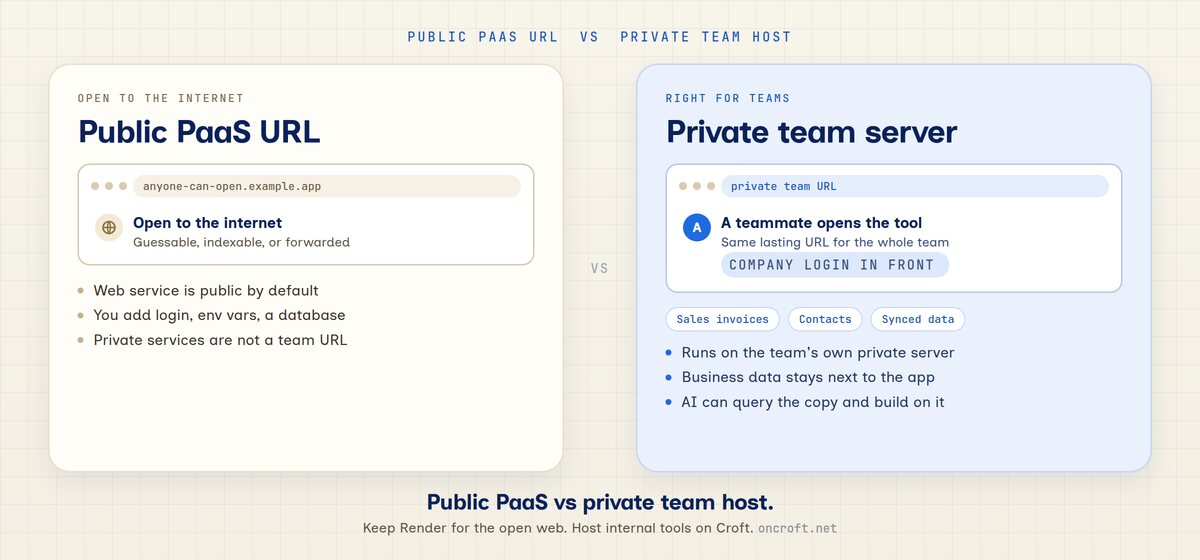
A Render alternative for private internal tools: keep the public PaaS for internet-facing apps, and host team-only tools on Croft. Private server, company login, synced business data the AI can query.
Quick answer
A good Render alternative for private internal tools is a private team
host, not another public PaaS. Render is a strong place to run an
internet-facing web service: every web service gets a public onrender.com
URL. For a tool only your company should open, that public URL is the wrong
default. You add your own login, manage env vars and a database service, and
pay per service.
Croft is the other posture. Apps run on the team’s own private server. Everyone signs in with the company login. The same server keeps a current copy of the business tools you connect, so the AI you already use in Cursor, Claude Code, or ChatGPT can query that data and build on it. That is private hosting for AI-built team apps, and the usual Render alternative for internal apps when the audience is your people rather than the open web.
Render vs Croft for a private internal tool
| Need | Render | Croft |
|---|---|---|
| Who can open it | Anyone who can reach the public web-service URL, unless you lock the app down yourself | People you invite |
| Sign-in | You add login to the app | Company login in front of the app |
| Where it runs | Render’s public PaaS (web services are public by default) | The team’s own private server |
| Data / business connectors | You wire APIs, env vars, and often a separate database service | Synced copy of business data on the same private server |
| Who it’s for | Internet-facing apps, APIs, and services | Private internal tools and AI-built team apps |
This is posture, not a knock on Render. Render is good at public PaaS work. Croft is a Render alternative for private internal tools because the host starts private. See also Croft vs Railway and the alternatives hub.
Render is a good public PaaS. That is a different job.
Nothing here says Render is a bad product. It is a capable public host: deploy from Git, get HTTPS, scale compute. Render’s own docs are clear about the default.
- A web service is reachable on the public internet at an
onrender.comsubdomain (you can add a custom domain). That is the service type for a browser app. - A private service has no public URL. Other Render services on the same private network can reach it. Teammates cannot open it in a browser. It is for infrastructure your other services talk to (the docs use examples such as Elasticsearch), not for a staff tool.
- Login for the app is yours to add. Render’s company login is for the dashboard. The web service itself is public unless you put sign-in in the app, or (on higher plans) restrict inbound IPs.
- Env vars are set per service in the dashboard (or in a Blueprint).
- A database is a separate Render service you add and wire up.
- Pricing is a workspace plan plus compute billed per service while it runs (at the time of writing; see Render’s pricing page for current rates).
That stack is the right call for a product or API on the open web. It is extra work when you only needed to host an internal tool privately instead of Render.
The cliff after you build the internal tool
Cursor, Claude Code, ChatGPT, and similar assistants make a useful team app in an afternoon: an ops panel, an approvals queue, a roster, a tracker. It runs on your laptop. Then the team needs a URL.
On a public PaaS the next chores are familiar:
- Deploy a web service so people can open it (public URL).
- Add login so the rest of the internet cannot.
- Set env vars and often stand up a database service.
- Pay per service as the next internal tool appears.
Developers hit this after shipping something the company actually uses. They want a Render alternative for internal apps without becoming ops for a public host. Non-developers hit the same cliff when the assistant built something useful and there is no lasting place colleagues can bookmark. Croft is for that team job. It is not a product for people who “cannot code.”
This post is the Render decision for a private internal tool. Adjacent hosting choices (not repeats of this one): Where can you host side projects and team tools without a PaaS?, Croft vs Railway for private team apps, How to share an internal tool without a public URL, and How do I deploy an app built with Claude Code so only my team can use it?.
What a private team host actually is
For an AI-built internal tool, “private” is not “a public URL plus a password.” It means:
- A lasting URL colleagues can bookmark
- Private by default, not a public link you lock down later
- Company login in front, so only your people open it
- Shared saved data, so everyone works in the same app
- Room to keep iterating in Cursor or Claude and redeploy
On Croft the app also sits next to the numbers it needs. Connect the tools you already run. Xero, Stripe, and the rest are on connectors. Croft keeps a tidy copy on your private server. New sources start visible to admins. Claude, ChatGPT, Cursor, and Grok can query that copy and say when it was last synced. Credentials stay with Croft. The app never holds the keys. Same pattern on your data.
Jobs that should run on their own (a Monday overdue list, a weekly report) can live as small apps on a schedule.
The developer path stays short: build in Cursor or Claude, deploy to the croft next to that data, invite the team. You do not run a public PaaS for each tool. Landings: for developers and host a Cursor app. Other public-PaaS comparisons: Railway alternatives and Vercel alternatives.
When Render is the right call
Pick Render when:
- The app is meant for customers or the public internet
- You want a classic public web service, preview deploys, and per-service compute
- You are happy owning login, env vars, and a database service as it grows
That is a strong job. It is the wrong default when you need a Render alternative for private internal tools.
When Croft is the right call
Pick Croft when:
- You built a small internal tool or team app in Cursor, Claude Code, or ChatGPT, and only the team should open it
- You want private hosting for AI-built team apps, not a public URL you lock down later
- The tool should sit next to current business data on the same private server
- You would rather connect the assistant and deploy than assemble a public PaaS for every staff tool
Typical path:
- Start a free trial to get a croft, your private server. 14 days free.
- Connect the tools you already run, if the app needs current numbers. Start with Xero or another source from connectors. New sources are admin-only until you open them.
- Point Cursor, Claude, or ChatGPT at Croft. Ask it to deploy the app to your croft (not a public host). Wait until it reports the deploy succeeded, then open the URL it returns.
- Invite colleagues. They open a normal URL, sign in with the company login, and use the tool.
You bring your own AI account. It costs nothing extra on Croft. Pricing: pricing.
FAQ
What’s a good Render alternative for private internal tools?
Croft, when the users are your teammates. Render remains the better fit for internet-facing web services. Croft is a private team host: your own server, company login, synced business data. Start from Croft for developers.
What’s a good Render alternative for internal apps?
A private team host. Deploy from Cursor or Claude to Croft, invite the people who should open it, keep the public PaaS for public products. See host a Cursor app.
How do I host an internal tool privately instead of Render?
Deploy it to your croft. Colleagues sign in with the company login. You do
not start from a public onrender.com URL and add login later. Related:
How to share an internal tool without a public URL.
What is private hosting for AI-built team apps?
A host whose default is the team. On Croft: private server, company login, app database with the deploy, and a current copy of connected business data the AI can query. See your data and connectors.
Is a Render private service a private URL for my team?
No. Render private services have no public URL and are for other Render services on the private network. A tool people open in a browser is still a web service, which is public by default.
Can the internal tool use our Xero or Stripe data?
Yes. Connect them on connectors. The AI queries the tidy copy on your private server. The app uses it without holding the keys.
Do developers use Croft, or is it only for people who cannot code?
Developers use it for small private team projects when they do not want public-PaaS ops. Everyone else opens the URL. Croft is not a substitute for people who “cannot code.”
How much does Croft cost?
Starter from $24/month billed annually, Growth $59 and Scale $99/month billed annually, Enterprise custom. 14-day free trial. You bring your own AI account. It costs nothing extra on Croft. See pricing.
Start free trial → · For developers → · Host a Cursor app → · Connect Claude → · Connect ChatGPT → · Connectors → · Automations → · Pricing →
Your team’s first app could be live tonight.
Free for a day, and a week once your first app is live. No card needed.
Free to try. No card needed.