Blog · November 18, 2026 · Rich Chetwynd
How to share an asset register app with your team
Host an asset register built with AI as a private team app on Croft. One URL for laptops and equipment, who has what, and warranty dates, with company login and backups. Not a shared spreadsheet or a public host.
Quick answer
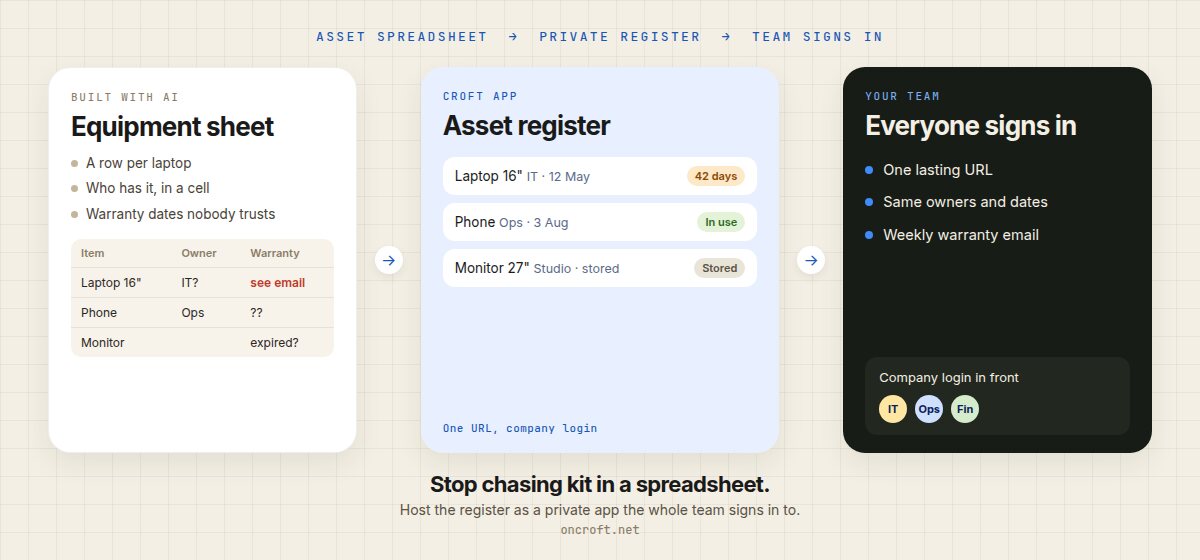
To share an asset register with your team, host it as a private app on Croft and give everyone one URL. IT, ops and whoever hands out laptops see the same equipment list, owners and warranty dates, with everyone signing in through company login. Connect Xero and Croft keeps bills and contacts current on that same private server, so Claude, ChatGPT, Cursor or Grok can answer “what did we pay for this laptop?” from live numbers. Ask the AI to add a weekly email of warranties expiring soon. That is the path for an asset register app built with AI and for moving an asset register spreadsheet to a private app for the team: one lasting app, next to data your AI can query, not a sheet anyone can overwrite or a public host.
The register works for you. Sharing it is the hard part.
Most teams start equipment tracking in a spreadsheet: a row per laptop, monitor or phone, a column for who has it, a date for warranty or renewal, and a cell for what it cost. Plenty of IT and ops people now ask Claude or Cursor to turn that sheet into a proper register: serial, assignee, location, in use or stored or retired, and a list of what is coming up. It works well for the person who built it. Then the rest of the team needs it, and someone still has to remember to look.
What usually happens:
- The asset spreadsheet stays shared. Someone sorts a column, a serial is overwritten, and nobody trusts who actually has the laptop.
- Warranty dates live in inboxes and calendar invites. The reminder is a person, until that person is on leave.
- Purchase cost already sits on a Xero bill. The serial and the owner sit in the sheet. You export bills, paste them in, and do it again next month.
- The AI-built tracker runs on one laptop, or as an HTML file you can email. Each person gets a snapshot. Nothing they enter is saved for anyone else.
- You put it on a public host. Serials, owners and purchase costs sit on the open web unless you build login yourself.
- You look at dedicated IT asset management software. It does barcodes, depreciation and a full ITAM workflow, plus a per-seat price, when you wanted one clear register and a reminder before a warranty lapses.
So the list is useful. The team still does not have one place to see who has what, ask an AI about it, and get told before cover runs out.
Related ops and finance posts: share a contract renewals tracker, share a leave tracker, share an expense tracker, and replace a spreadsheet stocktake. If the pain is pasting exports into chat, see stop exporting spreadsheets to ChatGPT. This post is the asset register path.
What sharing an asset register should mean
For equipment the business has to account for, “share it” is not “any live URL.” It means:
- A lasting URL IT and ops can bookmark and open in a browser
- One register: the same serials, owners, locations and dates for everyone, saved in the app
- Business data kept current on your own private server, so purchase costs from supplier bills are not a monthly paste
- A way to ask Claude or ChatGPT whose kit is due for replacement, from that copy and from the register
- A weekly email of warranties expiring soon, so the list is not only a page someone has to remember to open
- Team sign-in, so only your people see serials, owners and costs
- Backups and a way to undo a bad edit or a wrong import
- A path to keep improving it in chat (a checkout history, a spare-pool view, a repair status) without managing servers
Recoverability matters for records like this: App hosting with backups and versioning.
Shared spreadsheet vs dedicated ITAM vs public host vs Croft
| Need | Shared asset spreadsheet | Dedicated IT asset management software | Public app host | Croft private app |
|---|---|---|---|---|
| Starting point | The sheet you have | The vendor’s ITAM workflow | The tracker you built, published on the open web | The tracker you built with AI, or the Assets template |
| Fields that match how you track kit | Columns you maintain | Configured within the product’s options | Whatever you shipped, then you add login | Whatever you ask your AI to build |
| One register for everyone | Until someone edits a serial | Yes | Extra setup | Yes, one app database |
| Current purchase cost from the books | Manual export from Xero | Sometimes, as a paid integration | You wire it | Xero bills and contacts, kept in sync |
| Ask Claude or ChatGPT who has what | Paste the sheet into chat | No | No | Yes, from the copy on your server |
| Weekly warranty reminder | Calendar invites, or a person | Often, inside that product | You build a job | Yes, as an automation |
| Private to your people | Depends on sharing settings | Yes | You build login | Private server, company login |
| Keep changing it in Claude or Cursor | No | No | Varies | Yes |
| Cost shape | Free, plus the time it takes | Usually per seat, bundled with ITAM features | Hosting plus the login you add | One flat plan for the team |
Dedicated IT asset tools are built for teams that need barcode scanning, depreciation and a full hardware lifecycle. That is the right buy when that is the job. Public app hosts are strong for public products. They leave serials and owners on a public URL unless you add login yourself. Croft starts from the app your AI already built, or from a template, and gives it a private home next to the business data your assistants can query. It is not a public app host, and it is not “keep the spreadsheet forever and wrap it.” More side-by-sides: compare Croft.
Your assets, as data your AI can use
Croft is the private place your team’s business data lives. Connect Xero and Croft keeps a tidy, up-to-date copy of invoices, bills, contacts, payments and accounts on your own server. It arrives as named datasets you can browse: Sales invoices, Bills, Contacts, Payments. Claude, ChatGPT, Cursor or Grok then answer questions from that copy and say when it was last synced. Credentials stay with Croft. See your data and connectors.
Xero does not store “this laptop is with ops, serial HB16-4412, warranty ends 12 May.” That is what the register is for. The useful split is:
- Bills and contacts, kept in sync, so supplier names and what you paid for equipment are current. Xero is marked kept in sync on the connectors page. That copy lives on your server, not in a spreadsheet you exported.
- Serials, owners, locations and warranty dates in the app, so the team has one register to open, and the AI has something to remind you about.
Ask in plain words: which suppliers did we pay the most for hardware this year, which bills mention laptops, which items in the register have a warranty ending in the next 60 days. Each assistant sees the sources you have allowed, and they share one team memory. Tell it “remember for the team: laptops over three years old go back to IT” and Claude and ChatGPT both know the rule.
Setup: connect Claude or connect ChatGPT. Cursor and Grok use the same kind of link. See connect Cursor and connect Grok.
The register the team opens, and the reminder that runs
Asking is half of it. The other half is the app and the automation your AI builds on that data.
The Assets template is a register of serial, assignee, location and purchase date, with in-use, stored or retired. Install it on your croft, or describe the same thing to your assistant. The team opens one URL. They sign in with company login. Everyone sees the same rows.
Then ask for a weekly email of warranties expiring soon. That is an automation: a small job the app does on a schedule, such as an email every Monday. Nobody has to remember to open the page. Schedules keep running after a deploy. If you want the same list in Slack, the app can use a Slack connector without the key ever touching the app’s code.
The same pattern fits software seats: the Licenses template already tracks purchased vs assigned seats, cost, and 60-day renewal alerts.
Each app has its own SQLite database, with shared workspace data across your apps, so the register is not trapped in one file on one laptop. You can open the app, read it and change it. Actions that delete or cannot be undone ask first, and every run is logged with who asked and which AI did it.
That is the equal half of the product: a current copy of the books your AI can query, and an asset register plus a weekly warranty reminder hosted on the same private server.
Steps: asset spreadsheet to private team app
- Start a free trial to get a croft, your private server. 14 days free.
- Connect Claude or ChatGPT, or Cursor or Grok. Or use Ask Croft in the browser if you prefer not to connect an assistant yet.
- Connect Xero if the purchase costs already live in the books. Connecting starts the sync. There is nothing else to install. Bills and contacts show as named datasets, visible to admins until you open them to the team. You choose how much history to keep.
- Bring the register: paste the artifact, share the spreadsheet’s columns, or start from the Assets template. Ask the assistant to deploy the asset register as an app on your croft (not to email a file or publish a public URL). Import current rows from the spreadsheet once.
- Ask it to email the list of warranties expiring soon every Monday. That job is an automation.
- Invite the team. People open a normal URL, sign in with company login, and work from the same register. Keep chatting to add a checkout history, a spare-pool view, or a repair status. Deploys and rollbacks stay on the server.
More on the product path: From artifact to app and templates. Building in Cursor? See host a Cursor app and Croft for developers.
You do not need to learn nginx, Docker, or “how to deploy.” The assistant can ship the app, whether you write code every day or you are the person who already owns the spreadsheet.
FAQ
How do I share an asset register with my team?
Host it as a private app on Croft and invite the people who track equipment. Everyone gets one URL, the same register, and one place to see who has what. See artifacts to apps and connect Claude.
Can I build an asset register app with AI?
Yes. Describe laptops, serials, owners, locations, costs, and warranty dates. Claude, ChatGPT, Cursor or Grok builds it, and Croft hosts it privately. Starting point: the Assets template.
Can I turn our asset register spreadsheet into a private app for the team?
Yes. Share the columns and a few sample rows, or start from the template, ask the assistant to deploy it to your croft, then import current rows once. Related path for sheets: How to turn a Google Sheet into an app.
How do I host an equipment or IT asset tracker privately?
Deploy it to your croft instead of a public host. The app runs on a private server, everyone signs in with company login, and backups and rollback are included. Background: Where to host a vibe-coded app so it stays private.
Can Claude or ChatGPT tell us whose laptop is due for replacement?
Yes. Connect Claude or connect ChatGPT, then ask in plain words. If Xero is connected, bills and contacts stay in sync on the same server, so the answer is not a pasted spreadsheet. See your data.
Can we get a weekly email of warranties expiring soon?
Yes. Ask your AI to add that job when it builds the register. Details: automations. The same app the team opens can send the email.
Should we buy dedicated IT asset management software instead?
If you want barcode scanning, depreciation and a full ITAM suite in one vendor product, that software is a sound choice. If you want one equipment register that matches how your team works, owned by you and changeable in chat, a private Croft app is lighter.
Does this use our Xero bills for purchase cost?
It can. Croft has a Xero connector that keeps invoices, bills, contacts, payments and accounts in sync. The register holds the serials, owners and warranty dates. You can also start from the spreadsheet and connect Xero later.
Who can see the asset register?
Only people you invite to your croft can open the app, and they sign in with company login. On every plan, roles (admins, creators, members) control who can build and change apps. New Xero sources start visible to admins only.
Can developers use the same path?
Yes. Developers use Croft when they want a private team tool without standing up a public hosting platform. See Croft for developers and host a Cursor app.
How much does Croft cost?
Starter from $24/month billed annually, Growth $59 and Scale $99/month billed annually. 14-day free trial. See pricing.
Start free trial → · Assets template → · Connect Xero → · Your data → · Automations → · Pricing →
Your team’s first app could be live tonight.
Free for a day, and a week once your first app is live. No card needed.
Free to try. No card needed.